
Retirement Living takes an unbiased approach to our reviews. We may earn money when you click a partner link. Learn More
Types of Medical Alert Systems
There are three main categories of medical alert systems: in-home or mobile, monitored or unmonitored, and landline or cellular. Basic in-home systems start at just $20/month in some cases, while advanced mobile devices like smartwatches can cost $60/month or more.


Updated:
At a glance:
- Landline-based, in-home medical alert systems are the most affordable monitored option. While their emergency help services are limited to the home, their monthly fees generally range from $20 to $30.
- Advanced mobile systems, like smartwatches, are the most expensive option ($30–$60/month) and allow on-the-go use via a cellular connection.
- While both landline and cellular medical alert devices can feature automatic fall detection, other add-ons, like GPS location tracking, caregiver notifications, and health monitoring, are generally limited to cellular systems.
If you’re an older adult with a high risk of falling or experience occasional medical emergencies, medical alert systems work to provide life-saving access to emergency responders. At the push of a button, monitored systems connect to a dedicated call center where you and your family members can get immediate help.
However, with a few different types of devices out there, determining the best medical alert system for yourself and your loved ones depends on your unique situation. So, whether you’re an active, traveling senior or homebound due to a disability, read on to learn the different features and costs for medical alert devices.
Different Types of Medical Alert Devices: Side-By-Side Comparison
| Type of system | Average monthly cost | Average upfront cost | Description |
|---|---|---|---|
| Unmonitored | $0 | $50 – $300+ | Non-subscription devices that dial pre-set emergency contacts (family members or 911), instead of a monitoring center. |
| In-Home (Landline) | $20 – $35 | $0 – $150 | Base unit with a dedicated help button that uses a reliable landline connection to reach the response center. |
| In-Home (Cellular) | $30 – $40 | $0 – $200 | Uses cellular networks to connect you to emergency services, allowing for easy relocation and functionality without a phone jack. |
| Mobile (Cellular) | $30 – $50 | $50 – $250 | Simple, on-the-go devices that use a strong cellular connection to access the monitoring center anywhere there’s service, at the push of a button. |
| Smartwatch | $40 – $60 | $100 – $350+ | Advanced wearable devices with key features such as water resistance, GPS tracking, fall detection, and health tracking. |
How Do Medical Alert Systems Work?
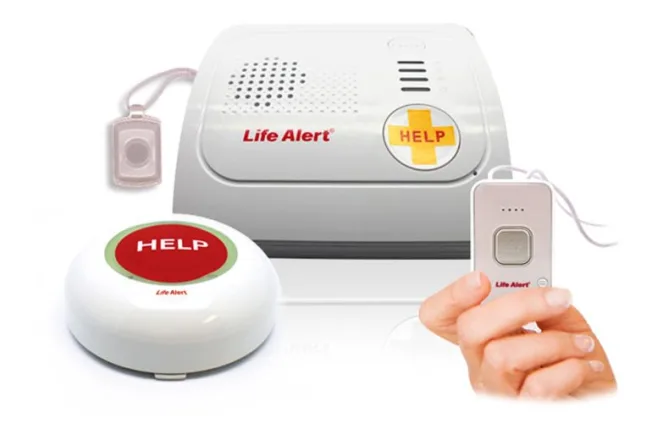
Medical alert systems include a variety of base stations and mobile devices that provide a help button you can press for assistance in emergencies. These buttons are typically worn as pendants or wristbands, which have limited battery life, or are fixed to the walls of your home.
When falls or medical emergencies occur, calls are placed to either another family member, caregivers, 911, or a professional monitoring center, with an average response time of 10 to 60 seconds. Even if you can’t speak or use two-way communication features, many systems can still dispatch emergency services using automatic fall detection or GPS location data.
Unmonitored vs. Monitored Systems
The primary difference between monitored and unmonitored systems is how they provide emergency services, which also impacts pricing. Monitored systems are the most popular, providing access to a dedicated response center and other safety features for a monthly fee. When you press the help button on these devices, you’re immediately connected to experts who can send first responders to your location.
On the other hand, unmonitored systems usually only have a one-time equipment or activation fee, with no monthly fees. They don’t connect to a monitoring center; instead, they contact either your family, a caregiver, or 911 in emergencies. Therefore, the reliability of responses depends on your emergency contacts and local police station.
In-Home Medical Alert Systems
Monitored in-home medical alert systems typically include a base station with a two-way speaker and a help button (either a simple wearable or a wall-mounted unit). They can be installed anywhere in your home, but have a limited range, meaning you can’t use them when on the go. They’re divided into two primary categories, based on how they connect to the response center:
Landline In-Home Systems
- Lower monthly fees
- Highly reliable inside the home
- Requires an active landline and won’t work if phone service is disconnected
Landline-based systems are the most affordable monitored option, connecting you to a professional call center through your home’s existing landline phone service. When the help button is pressed, the base unit uses your phone line to place an emergency call, allowing for quick responses and two-way communication. However, the device will not work outside the physical wires that create the connection, and it is hard to move once installed.
Cellular In-Home Systems
- Quick, flexible installation
- Strong, reliable connectivity in and around the home
- Higher monthly costs with limited range
These in-home medical alert systems have a built-in cellular connection that immediately links you to the monitoring center when needed. This allows them to function in and around the home without a phone jack, and makes them easier to relocate if you ever need to move or rearrange your living space. They’re also more likely to have companion apps and additional features, though not as likely as mobile devices.
Mobile Medical Alert Systems
Mobile medical alert systems have limited battery life, but give you the confidence to stay independent outside your home. They utilize a cellular connection to provide access to the monitoring center anywhere there’s coverage, whether going down the street to get groceries or flying across the country. With that in mind, many also include GPS tracking to help responders send emergency services to the correct location when needed.
Overall, mobile systems come in a wide variety of shapes and sizes and with unique features:
Mobile Medical Alert Options
- Pocket base stations: Similar to in-home devices, these simple two-piece units pair with wearables (often a necklace or wristband) that feature a help button. Pressing the help button contacts the response center, while the speaker and microphone are in the base station.
- All-in-one devices: Work similarly to the former option, but without needing two separate pieces. These lightweight devices clip easily to lanyards or belts, providing unconscious protection wherever you go.
- Smartwatches: More advanced systems that feature a screen for navigating a variety of added features, as well as a dedicated help button on the side of the device. Common add-ons that improve your well-being include two-way talk, health tracking, and app compatibility.
- Bluetooth systems: Sends emergency alerts and makes phone calls through your smartphone when the help button is pressed. While these devices typically have the longest battery life, they require a charged, nearby phone to function.
How To Choose The Best Type of Medical Alert System for You
The best medical alert system for you depends on your current medical conditions, travel frequency, and budget. Here are some of our top tips for choosing the right device:
- Consider your travel frequency: Do you spend most of your time at home, or do you still regularly run errands, go on vacation, or attend appointments? Note how often you leave your home each week to determine whether an in-home system or a mobile device is the better fit.
- Assess your mobility needs: Consider your fall risk, chronic health conditions, and whether you live alone. These factors can help you decide whether features such as automatic fall detection, GPS tracking, or caregiver notifications are necessary.
- Set a realistic budget: Determine how much you can spend based on monthly fees, upfront equipment and activation fees, long-term contracts (including cancellation fees), optional add-ons, and protection plans. When financial assistance isn’t available, it’s important to prioritize the features that maximize your safety.
- Determine coverage: Take note of your current healthcare plan, whether Medicare, Medicare Advantage, Medicaid, or private insurance. Ask if the device you need is covered by both the provider and your insurance. If not, try finding a device that is or reaching out to nonprofits like your local Area Agencies on Aging (AAA) for financial assistance.
- Compare brands and devices: Research customer reviews and company policies. Look for clear pricing, no long-term contracts, reliable monitoring centers, and medical devices that align with your lifestyle.
Bottom Line: The Type of Medical Alert System You Need Depends on Your Lifestyle and Budget
Medical alert systems generally fall under three distinct types: unmonitored or monitored, landline or cellular, and in-home or mobile. Each type has unique pros and cons, with additional features usually adding to the overall price tag.
If you’re a senior who spends most of your time home alone, a basic in-home device can be an affordable, ideal solution. However, if you travel regularly or have severe mobility concerns, mobile devices with advanced features may be more preferable.
Ultimately, the best medical alert system for you depends on your unique circumstances, but you should always research companies thoroughly before you invest. That way, you can have peace of mind knowing you’re getting the best deal.
Frequently Asked Questions (FAQs) About Types of Medical Alert Systems
PERS is a broader category that medical alert devices fall under, and another name for them. It’s also a term used by insurers (like Medicaid) and regulatory bodies (like the FTC) to regulate and cover applicable devices.
No, you don’t need Wi-Fi or a cell phone to use most medical alert devices, as they either connect to a monitoring center through dedicated landline cables or a cellular network. Mobile Bluetooth devices are an exception to this, as they rely on a smartphone to contact the response center.
Whether you should choose a monitored or unmonitored system depends on your personal mobility needs. For example, seniors with minor mobility concerns who live near family or caregivers can more consistently rely on emergency contacts, thereby saving money on an unmonitored device.
On the other hand, seniors who live alone or travel benefit from GPS tracking, automatic fall detection, and immediate help from the monitoring center.
You should choose an in-home device if you’re primarily homebound, as they have a more consistent connection and stronger battery life. Mobile systems are ideal for on-the-go seniors who still shop, travel, and visit appointments on their own.
Medical alert system costs vary by type and additional features, but the average monthly cost typically falls between $25 and $50. One-time equipment fees generally range between $100 and $350+.
No, Original Medicare (Parts A and B) does not typically cover the cost of medical alert systems. However, some Medicare Advantage and Medicaid plans might cover them if you can provide proof of medical necessity.
Help us improve our medical alert system data! If you’ve recently purchased or received a quote for a medical alert system, email us at [email protected]. Your personal details will remain completely confidential.