
Retirement Living takes an unbiased approach to our reviews. We may earn money when you click a partner link. Learn More
How To Choose a Medical Alert System
Choosing the right medical alert device depends on several factors. Consider the company, your medical needs, your budget, and any extra features you want.


Updated:
At a glance:
- Landline-based, in-home medical alert systems are the most budget-friendly and reliable options for rural seniors.
- On-the-go seniors can benefit from mobile systems that use cellular networks.
- Monthly costs often depend on added features. These can include automatic fall detection, GPS tracking, caregiver notifications, and more.
- The average monthly cost of a medical alert device $37. The total cost includes upfront equipment costs, activation fees, monthly monitoring fees, warranties, and more.
If you’re a senior or have a loved one with medical concerns, medical alert systems help provide peace of mind through reliable monitoring and emergency response services. These are commonly referred to as personal emergency response systems (PERS). In-home and mobile medical alert systems offer different formats and functionalities, tailored to your specific needs.
Every system has personalized features and prices. It’s important to weigh all your options before making a decision. Our team analyzed types of medical alert systems and their features to help you choose the best medical alert system for your situation.
Understanding Different Types of Medical Alert Devices
These highly useful monitoring systems come in a variety of shapes and formats. The most common options are either mobile, wearable devices, or in-home systems with a dedicated emergency button.
Here are some key variations to consider.
Mobile Medical Alert Devices vs. In-Home Base Stations
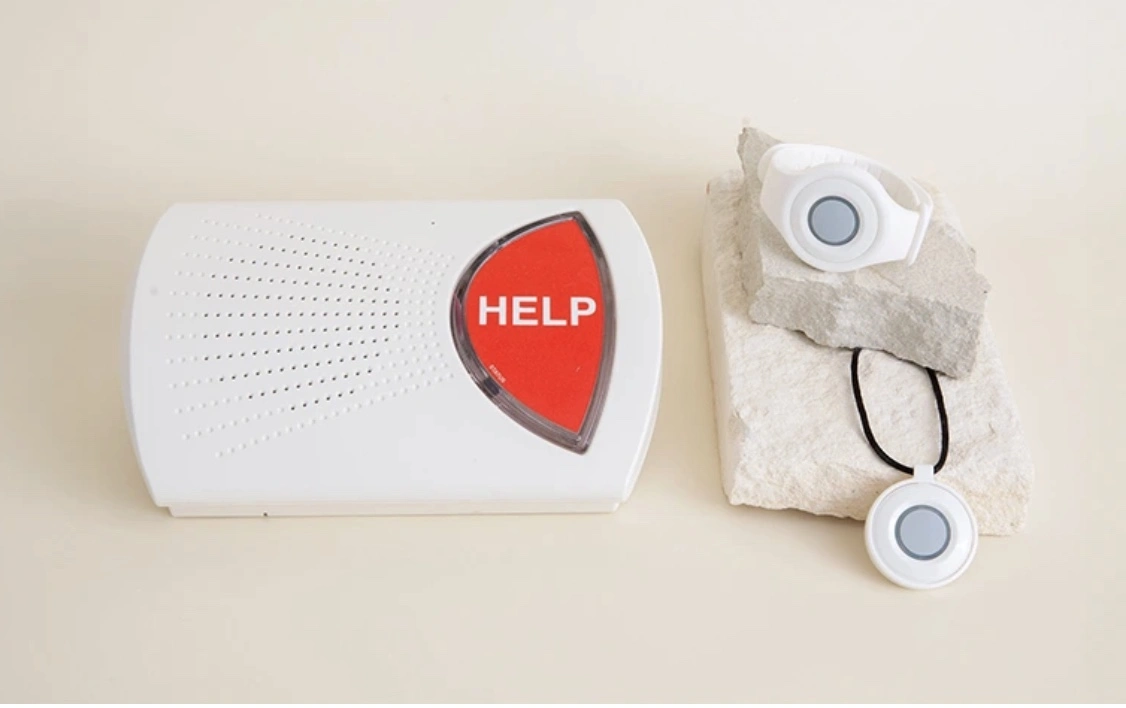
In-home base stations are the most budget-friendly option. They utilize either a landline or cellular connection for monitoring services. Once installed in your home, the stationary base unit usually comes with a connected speaker and a wearable help button. You must press the button for emergency services.
Mobile medical alert devices are designed for people who want protection both at home and on the go. Wearable devices include pendants, bracelets, smartwatches, and even clip-ons. They utilize GPS tracking to connect directly to the call center. The result is access to emergency assistance no matter where you are.
Cellular Network vs. Landline Systems
Mobile systems rely on a cellular network to function. In-home devices can use either a cellular or landline connection.
Cellular-based devices work similarly to your cell phone. They utilize wireless networks nationwide to establish a connection.
Landline systems are more limited in scope. They use a wired telephone connection inside your home. This connection is often more reliable in areas with poor cell coverage. They are a great option for seniors living in rural areas.
Monitored vs. Unmonitored Systems
Both cellular network and landline medical alert devices can connect directly to a 24/7 monitoring center. These monitored systems can immediately contact responders in the event of a medical emergency. They provide extra peace of mind for seniors living alone or with severe health concerns.
Unmonitored systems do not connect directly to a monitoring center. They are programmed to call pre-set emergency contacts when activated. This can include caregivers, family members, neighbors, or 911. Unmonitored options are typically more affordable with small or no monthly fees. However, they rely on the availability of the included contacts for quick, emergency response times.
Choosing the Best Medical Alert System For Your Situation
Every older adult and their loved ones have specific needs to consider. To find the right medical alert system for your situation, here are some key factors to weigh:
- Lifestyle needs: Do you spend most of your time in your home or on the go? Mobile medical alert systems are generally more suitable for seniors living in cities or those who travel frequently. In-home, landline-based units are affordable and reliable for rural seniors at risk of falling.
- Monitoring preference: Do you have severe medical or mobility issues? 24/7 monitoring with two-way communication is often crucial for seniors living alone or with ongoing medical needs. Unmonitored systems can be suitable for those with mild mobility concerns.
- Budget: What is your budget? Before you invest, be sure to compare upfront equipment costs. Consider activation fees, monthly monitoring fees, and warranties. Additional charges may apply for GPS tracking or fall detection.
- Key features & add-ons: Consider the features and available add-ons for each device. Many systems offer automatic fall detection, medication reminders, and caregiver notifications. Activity tracking and dedicated apps may also be available.
- Response Time: If using a monitored system, research the reliability of the company’s emergency responders. Connecting to the response center for medical alert services should take less than 60 seconds.
- Reliability: Consider user reviews related to battery life, backup power options, and system durability. This is especially important if you live in an area prone to power outages.
Medical Alert Companies Compared
| Pricing and Features | MobileHelp | Medical Guardian | Bay Alarm Medical | Life Alert | Lifeline |
|---|---|---|---|---|---|
| In-home base unit starting price | $24.95/month (landline or cellular) | $31.95/month (landline) $38.95/month (cellular) | $27.95/month (landline) $$34.95/month (cellular) | $49.95/month (landline) $69.95/month (cellular) | $27.95/month (landline) $34.95/month (cellular) |
| Mobile device starting price | $34.95/month | $39.95/month | $34.95/month | $69.95/month | $34.95/month |
| Fall detection price | $5.50 – $11/month | $10/month | $10/month | Not Available | $15/month |
| Minimum contract required | One month | One month | No long-term contracts | Three-year | No contract required |
| Average response time | 26 seconds | 8 seconds | 16 seconds | 68 seconds | 12 seconds |
| Smartwatch option | No | Yes | Yes | No | Yes |
How To Get An Affordable Medical Alert System
Original Medicare (Parts A and B) usually does not cover medical alert systems. Some Medicare Advantage, Medicaid, VA, and long-term care plans might. You can also reach out to state programs and nonprofits, like your local Area Agencies on Aging (AAA), for financial assistance.
If those options aren’t available, ask medical alert companies about discounts and financing options. For example, brands like Bay Alarm Medical start as low as $25 per month. MobileHelp offers flexible one-month contracts and packages combining in-home and mobile coverage.
We recommend choosing companies with no long-term contracts and transparent pricing.
How to Choose a Medical Alert Button
In-home help buttons are often one of the most affordable ways for seniors to make emergency calls. The button itself can be either wearable or mounted to the wall. It is included with the base station that connects to the monitoring center.
Getting one is as simple as reaching out to the right medical alert company. For example, MobileHelp Classic and Lifeline HomeSafe include a landline or cellular base station with a wearable help button.
How to Choose a Medical Alert Bracelet or Necklace
Medical alert bracelets and necklaces are great water-resistant or waterproof options for seniors on the go. They use a cellular connection to access the monitoring center from almost anywhere.
Consider looking into Medical Guardian’s lightweight, waterproof wristbands. Lifeline’s HomeSafe with AutoAlert offers fall detection as an added feature for its necklace-style pendant.
How to Choose a Medical Alert Smartwatch
Not every medical alert company offers smartwatches, but they’re a great way to safeguard against medical emergencies. They also keep track of your day-to-day wellness. Features often include step tracking, weather updates, and direct GPS connection to the monitoring center. You can also look into using smart technology like Apple Watches as a monitoring system, which may offer similar features to a medical alert system.
Medical Guardian’s MGMove Smartwatch is designed specifically for seniors. It provides both activity tracking and a help button. Bay Alarm Medical also offers a smartwatch option with two-way communication and GPS tracking.
Medical Guardian
Great variety
Call chain for caregivers
Sleek, stylish wearable devices
ADT Medical Alert

Great plans
Home temperature monitoring
Fixed-rate service
The Bottom Line
Medical alert devices come in a variety of shapes, sizes, and functionalities. Options include everything from simple landline-based help buttons to mobile wristbands and smartwatches. Every type of system has its own unique pros and cons to consider. For instance, while in-home systems may be more affordable, they may also lack the advanced safety features offered by mobile devices.
On-the-go seniors may not feel fully protected by landline-based systems. On the other hand, rural seniors who rarely leave their homes could benefit from the increased reliability.
Ultimately, taking your healthcare into your own hands as a senior requires understanding your unique location, budget, and medical needs.
Frequently Asked Questions
From pendants to in-home help buttons, there are many different types of medical alert systems to choose from. You can choose whether the system is landline or cellular-based. You can choose in-home or mobile. You can choose between monitored or unmonitored service. Systems can also be a combination of these characteristics. Every system has unique pros and cons depending on your situation and mobility needs.
Landline-based, in-home systems are usually the most affordable. For example, all the companies we listed offer landline-based systems that are $7-$20 more affordable per month than an in-home system that uses a cellular network. Most mobile systems are more expensive than any in-home option.
While Original Medicare (Parts A and B) doesn’t cover medical alert systems, some Medicare Advantage and Medicaid plans do. You must provide a relevant diagnosis and a doctor’s note that explains why it’s a medical necessity. Many Veterans Administration and state programs can also provide financial assistance if you qualify.
Some seniors, especially senior veterans, may be eligible for a free medical alert system. For example, Veterans Benefits may partially or fully cover the system. You can also reach out to local nonprofits for assistance.
Medical alert device costs vary depending on the type and additional features, but the average monthly fee typically ranges from $25 to $50.
There are several reliable medical alert companies you can choose from, including Lifeline, Bay Alarm Medical, Medical Guardian, MobileHelp, and more.
Help us improve our cost data! Email your latest medical alert system quote to [email protected]. Rest assured, your personal details will remain completely confidential.