
Retirement Living takes an unbiased approach to our reviews. We may earn money when you click a partner link. Learn More
Best Medical Alert Systems of 2026
We tested and chose the best medical alert systems that provide fast, reliable help.


Updated:
|
Expert Reviewed
Our top picks include Medical Guardian, Personal Living Alert, ADT Medical Alert, and the companies listed below. We bought and tested these systems to compare quality, response times, battery life, and customer service. We also talked with aging-in-place specialists before making our final selections.
4.7
Medical Guardian’s tagline, “Life Without Limits,” shows its mission. The company aims to help customers live independently. Medical Guardian provides five in-home or mobile systems. They also have a medical alert smartwatch and the Mini Guardian wearable alert button.
- Great variety
- Call chain for caregivers
- Sleek, stylish wearable devices

Personal Living Alert features medical alert products designed to provide peace of mind in the home and when you’re on the go. The company sells medical alert devices made in the U.S. with affordable access to 24/7 emergency help. Personal Living Alert’s monitoring center is based in America, providing services in dozens of languages.
- Great in-home range
- Flexible prices
- 2,000-square-foot range
ADT’s Medical Alert and On-the-Go systems are in-home and portable medical alert systems that cost around $1 per day. Your bill will never increase unless you upgrade medical alert services with ADT’s ForeveRate™ guarantee.
- Great plans
- Home temperature monitoring
- Fixed-rate service

4.5
Lively works on Apple Watches, Amazon Alexa devices, and Jitterbug cell phones. You need an active subscription plan to use it. Their wearable Mobile2 button is a waterproof medical alert system with enhanced GPS, and fall detection. It is FSA, HSA, and HRA eligible.
- Great for tech-savvy seniors
- Nurse on-call
- Compatible with Alexa and Apple Watch

4.8
LifeStation’s On The Go mobile medical alert system features fall detection, enhanced location technology and a reminder that lets you know when batteries are running low. Find My Loved One allows caregivers to locate the customer. LifeStation also offers landline and cellular systems for the home.
- Great Value
- No activation fee with most plans
- Caregivers can have access to mobile location

Life Alert is one of the most recognized names in the industry, famous for its “Help, I’ve fallen and I can’t get up!” campaign. The company offers dependable in-home and mobile systems. They are designed for quick emergency response. Life Alert has over 30 years of experience. It offers a solid lineup, though it’s more limited than newer competitors. Still, the company prides itself on keeping seniors safe with less reliance on smartphone apps or wearable tech trends.
- Long-standing reputation
- 24/7 emergency monitoring
- Three-step response system
Medical Care Alert is a Michigan-based company. They provide personal medical alert systems and monitoring services. No matter where you are—at home, in the yard, running errands, or traveling—Medical Care Alert has a system to help you when you need it. The pendant and wristband emergency buttons are waterproof for continuous everyday use.
- Great fast response
- Certified responders
- No equipment charges
4.4
LifeFone offers many consumer-friendly benefits, like the Subscriber Price Guarantee. LifeFone has medical alert systems for home and on-the-go use. Cancel any time and only pay for the time you’ve used.
- Great for daily peace of mind
- Price lock-in guarantee
- Large range of discreet wearables
You can buy a wearable medical alert device from GetSafe, but the company caters to consumers who don’t want to wear a button. GetSafe offers medical alert system packages for homes ranging from one to five bedrooms.
- Great for large homes
- No wearable devices required
- Can service large homes up to five bedrooms
Bay Alarm Medical is a medical alert system that offers 24/7 monitoring and trained professionals to assist in urgent times of need. Bay Alarm Medical has been protecting its clients for almost 70 years.
- Great customer service
- Vial of Life included with purchase
- Free spouse monitoring

4.4
Philips was the first company to offer a medical alert system in North America, serving hospitals and healthcare facilities since 1974. Today, Philips Lifeline helps seniors live independently and safely at home and on the go with medical alert systems that provide one-touch communication with trained representatives. With six points of mobile communication, Philips has the largest subscriber base of any medical alert company, with over 7 million people using the service.
- Great reputation
- Professional installation option
- GPS with five location technologies

4.5
One Call Alert is a long-standing medical alert provider offering simple, affordable systems for seniors at home or on the go. Its easy-to-use devices provide one-touch access to 24/7 monitoring, making it a practical choice for basic protection.
- Great for Affordable Plans
- Long-term contracts are not required
- Easy to use
Best Medical Alert Systems in Detail
The best medical alert systems are vital tools for seniors. They help maintain independence while ensuring safety.
Our list features companies like Medical Guardian, Personal Living Alert, and ADT Medical Alert. They offer fall detection, medical alert bracelets, and emergency buttons.
This guide reviews pricing and key features, such as device range, battery life, and customer feedback. This information helps you make an informed choice. To see how we chose our top picks, check our methodology.
Medical Guardian Review
Great variety
|
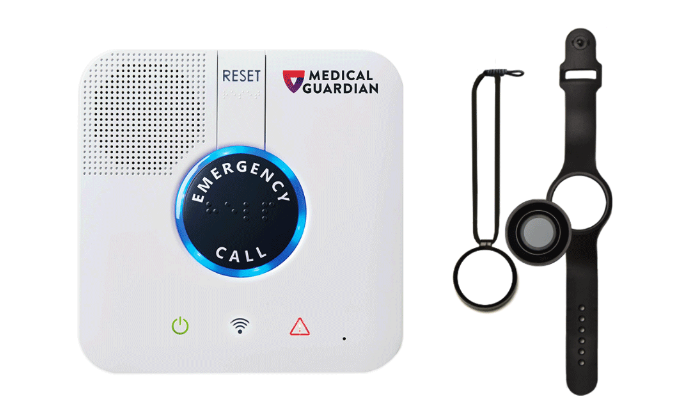
Medical Guardian has five easy-to-use medical alert systems. This includes two for home and three for use on the go. They offer two-way communication, GPS, step tracking, and a mobile app. This app helps you manage your health and safety information.
Medical Guardian Pricing & Plans
Medical Guardian offers medical alert systems with monthly plans that start at $27.95 and scale up to $42.95, depending on the device and features. They do not charge activation, equipment, shipping, or cancellation fees, and there are no long-term contracts. Optional add-ons include fall detection for $10/month and Care Circle Alerts with additional monthly charges.
The company has flexible billing cycles. You can choose month-to-month, quarterly, or annual options. If you pay annually, you get a discount. Medical Guardian is flexible and transparent for seniors seeking a reliable medical alert system.
Pros & Cons
Pros
- Transparent pricing
- A large variety of sleek wearables to choose from
- Free activation and shipping
Cons
- Lacking a trial period
- Slightly higher in price than some competitors
Who It’s Best For
Medical Guardian is great for seniors who travel often, are tech-savvy, or have many children and caregivers. It gives everyone peace of mind. Their mobile and GPS devices offer 24/7 monitoring and fall detection. This keeps users safe while they move around. The Care Center Alert lets family members stay updated during emergencies.
Medical Guardian wearable systems are sleek and discreet, coming in a variety of colors and styles for both in-home and on-the-go use. The in-home range is 1,400 feet, while the battery life is between one and five days. These medical alerts come with optional Care Circle Alerts. The Care Circle Alert will send text or email notifications to family and friends to keep everyone in the loop if you experience an emergency.
If you are new to medical alert systems, you can take their quick three-question product quiz to help you decide which option is right for you. However, to receive your quiz results, you must enter your name and email address so they can send the results to your email.
Medical Guardian values customer feedback and often uses it to improve their devices. They currently have 4 out of 5 stars on Trustpilot based on over 1,100 customer reviews.
To learn more, read our full Medical Guardian review.
Personal Living Alert Review
Great in-home range
|
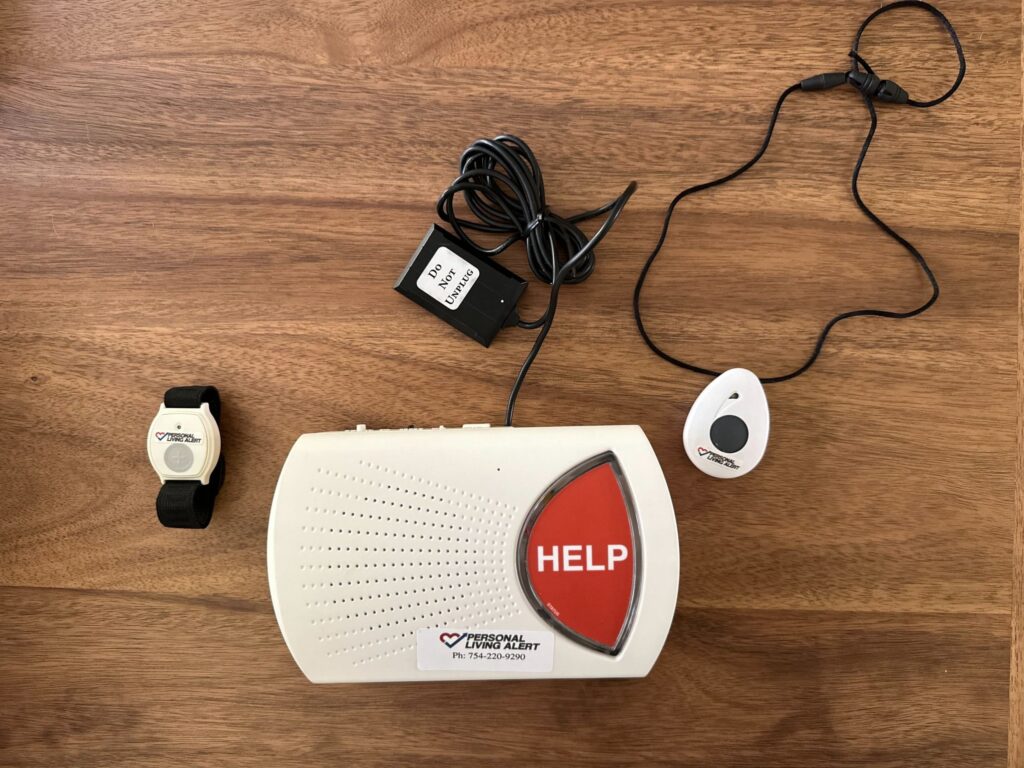
Personal Living Alert has a great selection of five different in-home and mobile medical alert systems. If you worry about power outages, the in-home unit is a great choice. It uses hospital-grade equipment, has a strong 60-hour backup battery, and covers up to 2,000 square feet.
Personal Living Alert Pricing & Plans
Monthly Personal Living Alert plans start at $22.90 and reach up to $55 per month. All systems come with the device included at no additional cost. Activation fees for the smart watches and a flat shipping fee of $22 might apply. Activation fees can be waived with annual billing.
Optional add-ons, such as watchbands, pendants, and fall detection, are available for an additional fee. These plans provide flexibility and comprehensive coverage to meet diverse user needs.
Pros & Cons
Pros
- Flexible prices
- In-home unit range of 2,000 square feet
- No long-term contracts
Cons
- Restocking fee if you need to return equipment
- Warranty coverage is an additional cost
Who It’s Best For
Frequent travelers and tech-savvy seniors can benefit from Personal Living Alert. Its hospital-grade equipment and fast response times provide reliable protection. They also have two smartwatch options with GPS tracking. These features ensure safety even when away from home.
During our test of the PLA in-home system, agents responded to our help request in just 18 seconds. It’s also one of the few medical alert companies offering an anti-wandering service. PLA devices have a battery life of up to five days.
To learn more, read our full Personal Living Alert review.
For a comparison with another leading medical alert systems, read our Personal Living Alert vs. Medical Guardian article.
ADT Medical Alert Review
Great plans
|
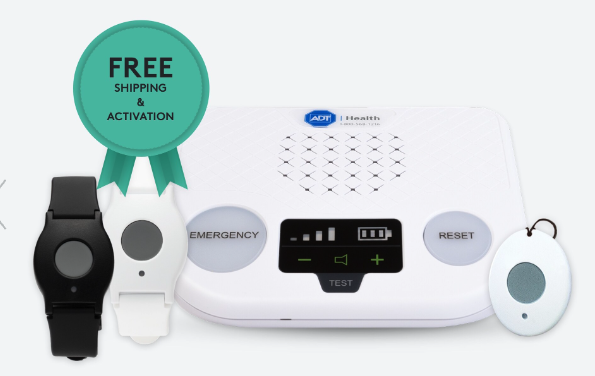
ADT is a well-known home security company that also provides medical alert systems. Their systems include a ForeveRate™ guarantee, ensuring your service price stays the same. This is great for budget-conscious customers.
ADT Medical Alert Pricing & Plans
ADT offers three tiers for its medical alert systems. Monthly monitoring starts at $31.99 for the Basic plan. The price goes up to $41.99 for the On-the-Go mobile option. Each plan has a $99.99 activation fee. There are no separate equipment fees. The base unit and wearable help button are included.
Optional fall detection costs an extra $11 per month. Customers who pick quarterly or annual billing get free shipping. They also receive a complimentary ADT lockbox. This adds value for those who commit long-term.
Pros & Cons
Pros
- Price is locked in with the ForeverRate guarantee
- Temperature monitoring is an option
- Well-known brand that receives
Cons
- Small in-home range of only 300-600 feet
- Fall detection is not always accurate
Who It’s Best For
ADT Medical Alert systems suit individuals at risk of falls, offering fall detection pendants that alert ADT’s 24/7 monitoring center. It helps seniors stay independent with quick access to emergency help.
A key feature is temperature monitoring. This is essential for seniors who are at risk of temperature-related illnesses due to extreme heat or cold. The ADT units detect unsafe temperatures in your home, making them a proactive choice for emergencies.
One downside is the in-home units’ range of 300 to 600 feet. This is lower than many competitors. The backup battery for the base unit isn’t specified.
A representative mentioned that current home security customers can add medical monitoring to their plan.
ADT Medical Alert currently has a 4.7 out of 5 stars rating on ConsumerAffairs, based on 605 customer reviews. It is a reliable and trusted tool for seniors aging in place.
To learn more, read our full ADT Medical Alert review.
For a comparison with another medical alert system, read our ADT Medical Alert vs. Medical Care Alert article.
Lively Review
Great for tech-savvy seniors
|
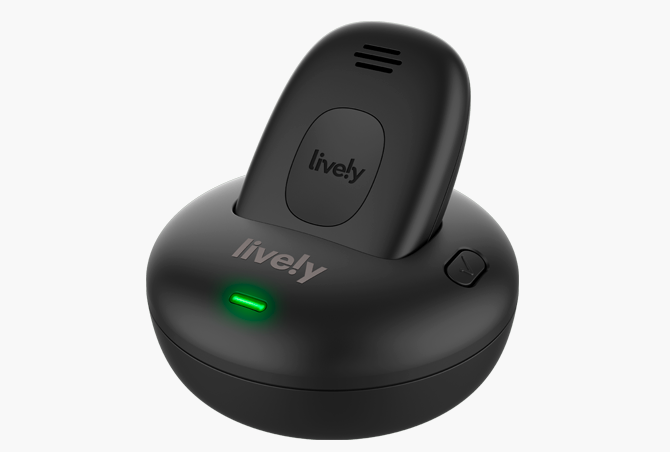
Lively is a great option for seniors who need their tech to be simple and uncomplicated. Their medical alert systems operate with a wearable device or a simplified flip smartphone.
Lively Pricing & Plans
Lively offers two monthly plans with its Mobile2 alert: the Basic Plan at $24.99 per month and the Premium Plan at $34.99 per month. Plans include 24/7 access to Lively’s U.S.-based emergency response team. Fall detection is optional and available for an additional $9.99 per month.
The Mobile2 device requires a one-time equipment purchase of $79.99, and activation fees apply. Shipping fees might also apply. These plans provide flexible and reliable coverage for seniors seeking safety at home or on the go.
Pros & Cons
Pros
- US-based emergency response team
- Additional perks like a nurse on call available
- Simplified tech for seniors
Cons
- Must use and purchase a Lively device
- Shorter battery life and needs to be charged daily
Who It’s Best For
The Lively medical alert system offers 24/7 US-based monitoring. It’s perfect for seniors seeking dependable, portable protection while enjoying their independence. It gives peace of mind to users and caregivers. This makes it a great choice for seniors who are active or have strong support networks.
The only wearable medical alert device Lively offers is the Mobile2, a waterproof all-in-one medical alert button. It can be worn on your belt, pocket, or purse; however, if you opt for fall detection, it must be worn around the neck for accurate results.
We like that Lively encourages seniors to contact through the Ask Lively feature anytime they feel uneasy, even if it’s not an emergency. For example, they encourage you to reach out if you smell a gas leak, experience chest pain, or even hear a strange noise around your home.
Lively offers two different subscription plans. The basic plan offers urgent response services and Ask Lively. The premium plan has these features, plus care advocate and nurse on-call services. The care advocate will help you build a personalized care plan to meet your health goals. The nurse on-call offers medical advice from doctors or nurses anytime, even nights and weekends, with just a button press.
To learn more, read our full Lively review.
For a comparison with another medical alert system, read our Lively vs. Medical Guardian article or Personal Living Alert vs. Lively article.
LifeStation Review
Great Value
|
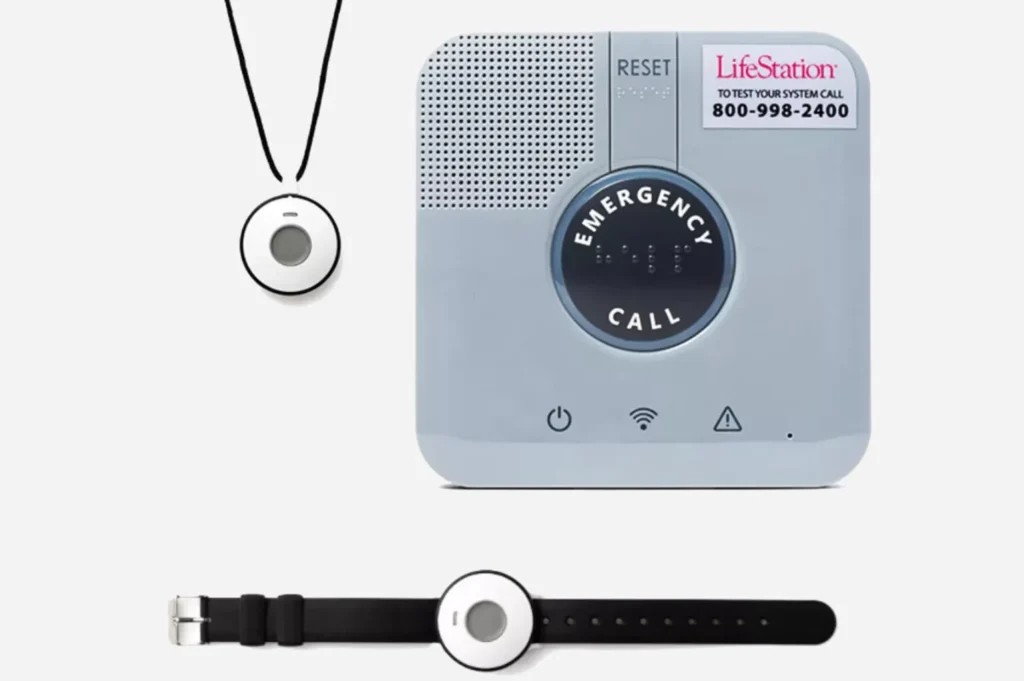
LifeStation has several medical alert systems designed for both at-home and mobile use. Their devices include two-way communication, GPS tracking, fall detection, and caregiver features like location services. LifeStation also offers a mobile app, which allows family members to track the user’s location and receive notifications during emergencies.
LifeStation Pricing & Plans
LifeStation offers medical alert systems starting at $36.95 per month, with plans varying based on equipment and features. Unlike some competitors, LifeStation may charge activation and shipping fees, but they offer month-to-month contracts, so you aren’t locked in long term. Optional add-ons include automatic fall detection for $10/month and caregiver app features for an additional monthly fee.
LifeStation also provides flexible billing, including monthly and annual payment options. Seniors who prefer extra caregiver support may find their Caregiver App valuable, as it provides real-time location and activity tracking.
Pros & Cons
Pros
- Caregiver App with real-time updates
- At-home and on-the-go options with GPS
- U.S.-based monitoring centers
Cons
- Activation and shipping fees may apply
- Fewer wearable style options than some competitors
Who It’s Best For
LifeStation is best for seniors who want strong caregiver support and family connectivity. The mobile app and GPS location tracking make it easy for loved ones to stay updated, while fall detection ensures a quick response in emergencies.
LifeStation’s in-home systems provide coverage up to 650 feet from the base station, while mobile devices work anywhere with cellular coverage. Wearables are simple and easy to use, though less customizable than other brands.
The company maintains an A+ rating with the Better Business Bureau (BBB) and is known for its responsive U.S.-based monitoring team. Customer reviews often highlight fast response times and the peace of mind LifeStation provides to both users and their families.
To learn more, read our full LifeStation review.
Life Alert Review
Long-standing reputation
|
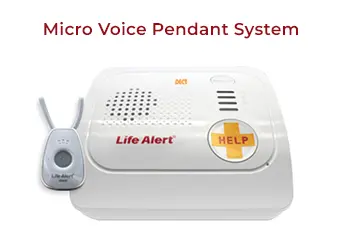
Life Alert is known for its strong focus on emergency response. It prioritizes safety over lifestyle features. The company has three main systems: a traditional in-home base unit, a help button pendant, and a GPS mobile unit for outdoor use. Each system connects directly to a 24/7 U.S.-based monitoring center with trained emergency responders.
Life Alert Pricing & Plans
Life Alert does not disclose pricing. There are no activation fees. Ground shipping is free. Some subscriptions also come with free gifts. Customers wanting pricing details and plan features should contact Life Alert directly.
Pros & Cons
Pros
- Multi-step response system
- Strong brand reputation
- Extended battery life
Cons
- Pricing is not disclosed
- Multi-year contract required
Who It’s Best For
Life Alert has a key feature: its three-step emergency response system. This system connects users to help fast. Responders also stay on the line until help arrives. The service is easy to use and dependable. It helps seniors who want a straightforward solution and who prefer talking to someone rather than using tech tools.
Life Alert devices are built for durability and long-term use—some units have battery lives of up to 10 years without needing to recharge. It doesn’t offer automatic fall detection, apps, or wellness features. Other brands include step tracking and caregiver portals.
Life Alert doesn’t show prices online and needs a multi-year contract. Still, it may attract those who value brand history and basic emergency responses more than modern features.
The company has a strong reputation built over decades. However, online reviews are few because there are fewer digital touchpoints.
To learn more, read our full Life Alert review. To explore how this company stacks up against a top competitor, read our articles on Medical Guardian vs. Life Alert and Life Alert vs. Medical Alert.
Also read our Life Alert Alternatives article to see how other medical alert systems compare against Life Alert.
Medical Care Alert Review
Great fast response
|
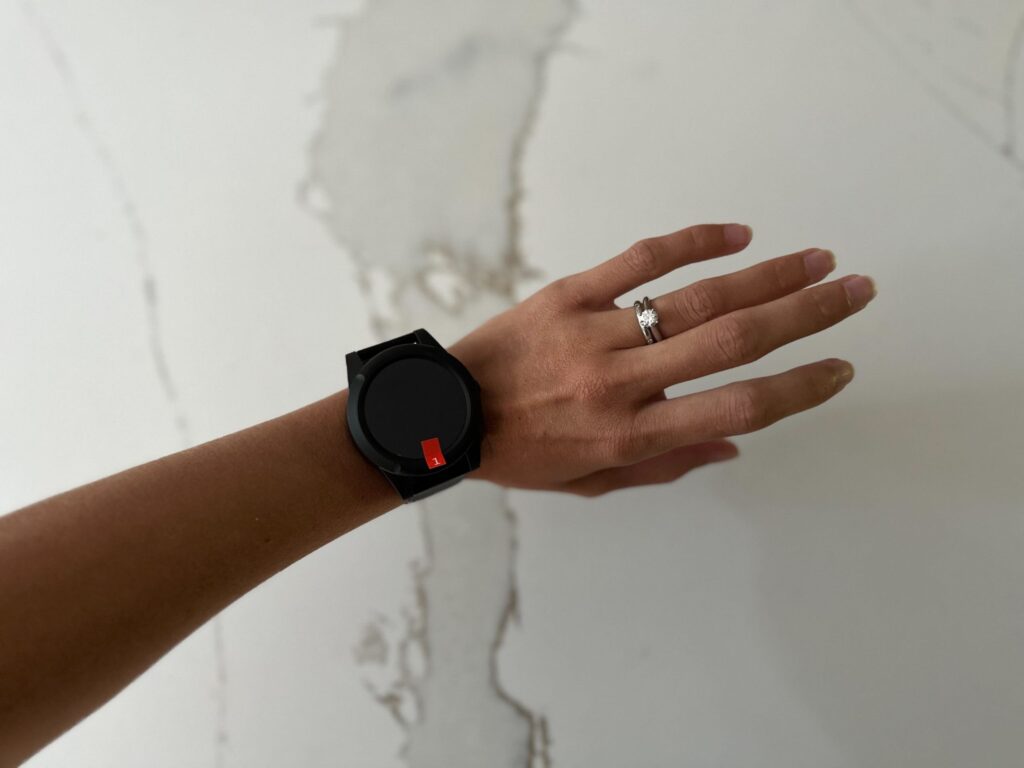
Medical Care Alert’s medical alert systems cater to a wide range of lifestyles—from staying home and indoors to traveling frequently. The company provides dependable, waterproof emergency buttons as pendants and wristbands.
Medical Care Alert has over ten years of experience. It connects users to certified emergency personnel anytime, day or night, through U.S.-based monitoring centers.
Medical Care Alert Pricing & Plans
Medical Care Alert offers various medical alert systems that give seniors dependable emergency help. Plans range between $19.95 and $45.95 per month. Notably, there are no activation or setup fees, and equipment is provided at no additional cost. Shipping is free, and customers can choose from flexible billing. Annual plans get one month free.
Medical Care Alert also provides a 14-day risk-free trial, allowing users to test the system and receive a pro-rated refund if not satisfied.
Pros & Cons
Pros
- No activation or equipment fees
- Certified emergency response center
- 14-day trial period
Cons
- Trial period excludes smartwatches
- Only a pro-rated refund during the trial period
Who It’s Best For
Medical Care Alert systems are best for seniors needing reliable, around-the-clock emergency support at home or on the go. They help people who live alone with little caregiver support. People want quick access to trained emergency responders. Medical Care Alert provides peace of mind, ensuring help is ready when needed.
Medical Care Alert has three main systems. You can use them at home with a landline, on the go with AT&T or Verizon, or a mix of both. All packages include a base unit with a two-way speaker. No equipment purchases or long-term contracts are required.
Devices let users talk straight to emergency personnel and help caregivers track locations. The HOME system uses a landline and is ideal for use up to 1,000 feet from the base unit. All devices are waterproof. They respond quickly and last up to three days on a charge. Caregivers can use an app, and it also offers optional fall detection. This makes them a great choice for active seniors.
To learn more, read our full Medical Care Alert review.
For a comparison with another medical alert system, read our Medical Care Alert vs. Personal Living Alert article.
LifeFone Review
Great for daily peace of mind
|
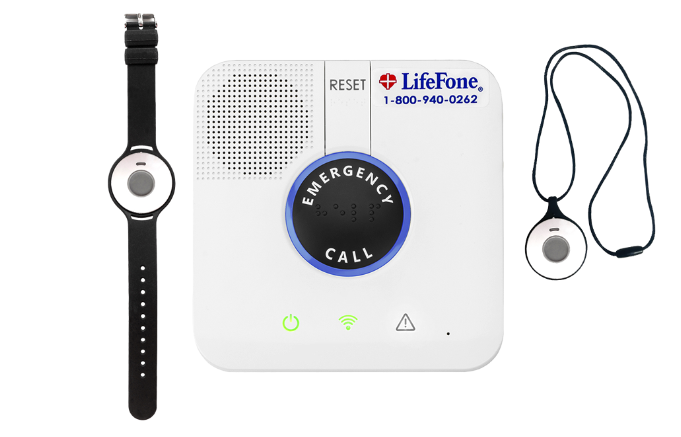
LifeFone has provided reliable service to seniors nationwide for over 40 years. LifeFone offers six different systems, including in-home and on-the-go options. The pendants, bracelets, and smartwatches are sleek and light. They are perfect for seniors who want discreet devices.
LifeFone Pricing & Plans
LifeFone has several medical alert system plans. Monthly prices start at $24.95 for an annual in-home landline plan and go up to $43.95 for the Safe Watch Active smartwatch. Costs depend on the device and payment option. You can save money by opting for an annual payment plan, which waives your shipping fees and gets you a month free.
There are no equipment fees and no activation or setup charges, making the cost structure transparent and predictable. Optional add-ons are available. You can add fall detection for $5 a month. The Caregiver Mobile App costs $8 a month. It includes features like temperature sensors, daily motion tracking, step tracking, and on-demand device location.
Pros & Cons
Pros
- A variety of discreet wearables to choose from
- Price locked in
- Free shipping and a free month with annual plans
Cons
- Some devices require frequent charging
- Lacking GPS in several devices
Who It’s Best For
LifeFone Medical Alert systems are best suited for seniors who want flexible plans and reliable protection at home and on the go. They are especially useful for older adults living alone. They also offer extra security with optional caregiver alerts. LifeFone offers easy-to-use devices and customizable features. It’s a great choice for families who want peace of mind while helping their loved ones stay independent.
LifeFone devices have a base range of 1,300 square feet, a battery life that ranges from 24 hours to 10 days, and a response time of around 15 seconds. At the time of publishing, LifeFone has a rating of 4.65 out of 5 stars on Trustpilot based on over 9,750 customer reviews.
To learn more, read our full LifeFone review.
GetSafe Medical Alert Review
Great for large homes
|
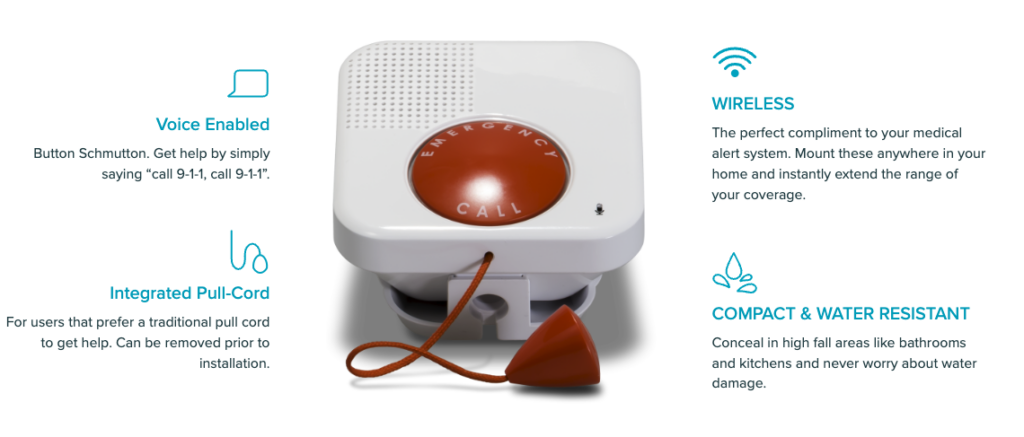
GetSafe and Bay Alarm are owned and operated by the same company (Balco Properties Family of Companies). GetSafe offers voice-activated products for home use. Bay Alarm provides wearable products for on-the-go coverage. Seniors can choose a medical alert system from GetSafe if they don’t want to wear a button. This system has voice activation, pull cords, and standard wall buttons.
GetSafe Pricing & Plans
GetSafe offers flat-rate 24/7 monitoring for $29.95 per month, with no variation based on home size or number of button devices. Equipment costs depend on home size: the Starter kit (0–1 bedrooms) is $79, the Standard kit (2–3 bedrooms) is $193, and the Select kit (4–5 bedrooms) $307.
There are occasional discounts; for example, at the time of writing, all kits were 50% off. All packages include 4G LTE connectivity and free shipping, and GetSafe’s monitoring centers provide U.S.-based support 24/7. If you want a wearable device, they offer pendants for an additional $25 and fall detection for $10 per month.
Pros & Cons
Pros
- Flat monthly rate
- Wearable devices are not required
- Discounts available
Cons
- Relies on cellular service despite being an in-home system
- Wearable devices are an additional cost
Who It’s Best For
GetSafe is ideal for seniors who spend most of their time at home. Although it is a home-based system, it does not require a landline and can be connected using a 4G LTE connection. They also offer wearable devices if you change your mind or want to keep one on hand.
GetSafe medical alert systems suit homes with up to five bedrooms. They have a five-year battery life and respond in just 25 seconds. Their in-home unit has a sensitive microphone and a loudspeaker. This ensures clear two-way communication. The voice-activated wall button goes in high-risk areas of your home. You can activate it by saying “call 911, call 911” or by pulling the bright red cord for help.
To learn more, read our full GetSafe review.
Bay Alarm Medical Review
Great customer service
|
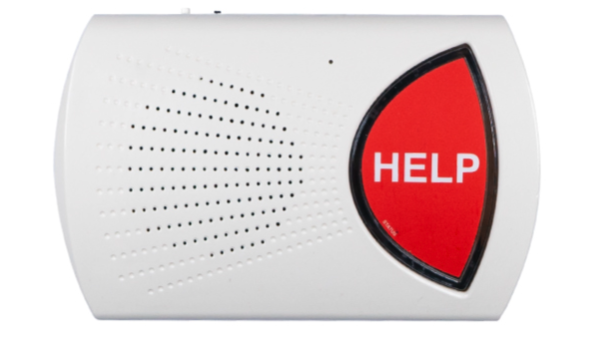
Bay Alarm Medical has provided life-saving services to seniors for over 70 years. As explained in our GetSafe review above, Bay Alarm is owned by the same company, Balco Properties Family of Companies. However, where GetSafe focuses on in-home products, Bay Alarm’s focus is directed to on-the-go devices. They have four different systems, including mobile devices and a basic in-home package.
Bay Alarm Medical Pricing & Plans
Bay Alarm Medical has several medical alert plans. The SOS Home In-Home system starts at $27.95 per month. For more options, the SOS All-In-One 2 costs $34.95 monthly. The SOS Smartwatch is the top choice at $64.95. There is a discount available for annual plans, which includes a free month and free shipping. Equipment and activation fees vary.
Mobile wearables like the SOS Micro and Smartwatch require a one-time device charge ($149–$199). Fall detection is optional for an additional $10 per month, and you can purchase an extra button for $35 if you have a spouse who also needs monitoring.
Pros & Cons
Pros
- Spouse monitoring available
- Vial of Life included
- 15-day risk-free trial
Cons
- Equipment fees can be pricey
- Wearables need to be charged more frequently
Who It’s Best For
Bay Alarm Medical Alert systems are perfect for seniors with many caregivers. Its tracking app and GPS devices help loved ones stay connected and informed. It gives caregivers peace of mind for their loved ones.
Bay Alarm Medical home systems can operate via landline or cellular connections. They offer Wi-Fi location services, GPS tracking, and automatic fall detection. Their mobile devices work on Verizon and AT&T networks.
They offer black, white, and four stylish medical alert necklaces called “Bella Buttons.” For those who prefer bracelets, they offer “Bella Bands,” which are stretchy nylon wristbands that come in four different colors.
We like that their mobile systems connect to the Caregiver Tracking app. This app helps you create and manage your safety plan. It lets your caregivers track your location anytime. Plus, it shows details about the device, like battery level and location history. The app also allows you to ring your device if it is ever lost or misplaced.
You also get the Vial of Life with your subscription. It stores your medical information for emergency services (EMS) to use in a crisis.
Bay Alarm currently has a 4.8-star rating out of 5 stars on Trustpilot based on over 1,775 customer reviews. Customers appreciate their rapid response time and excellent customer service.
To learn more, read our full Bay Alarm Medical review. Or, for a comparison with another medical alert system, read our Bay Alarm Medical vs. Life Alert article.
Lifeline Review
Great reputation
|
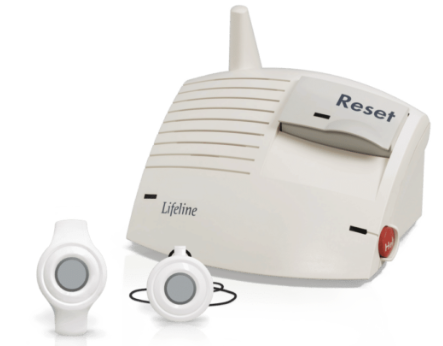
Lifeline, formerly Philips Lifeline, has served over 7.5 million seniors since 1974. They have a limited choice of medical alert systems. However, their prices are affordable, and they offer a range of safety features. Lifeline offers two medical alert systems: one in-home system and one for on-the-go use. The in-home system has two-way communication with a trained care specialist. It also offers optional fall detection.
Lifeline Pricing & Plans
Lifeline monthly plans start at $27.95 for the HomeSafe system, which is landline-based. The mobile On-the-Go Mini model costs $44.95. The cellular HomeSafe and Smartwatch are also in this price range, depending on billing type. Annual pricing offers slight discounts.
Each system has a one-time setup fee—usually $99.95. The Smartwatch option costs more at $159. There’s also a $29.95 shipping fee.
The setup charge includes activation and programming costs. You can also choose professional installation for an extra $99. Annual plans offer benefits like free shipping and a free lockbox. These perks boost the value for long-term customers.
Pros & Cons
Pros
- Professional installation is available
- Discounts available with annual plans
- Advanced GPS locator
Cons
- One-time set-up fee
- Smaller range on the in-home system
Who It’s Best For
Lifeline Medical Alert systems work well for active, tech-savvy seniors. They provide a trustworthy, clinically supported solution. You can reach trained response associates directly. Their on-the-go system features an advanced GPS locator. It uses five technologies, like Wi-Fi and two-way voice communication. This ensures help can reach you no matter where you are.
On the Lifeline website, you can take their five-question product selection quiz to help you decide which system is right for you. Lifeline shows your results right away. You don’t need to enter your contact info first, unlike Medical Guardian’s product quiz.
For more details, check out our full Philips Lifeline review. You can also read our article comparing Life Alert and Lifeline for a deeper look at their features and services.
One Call Alert Review
Great for Affordable Plans
|
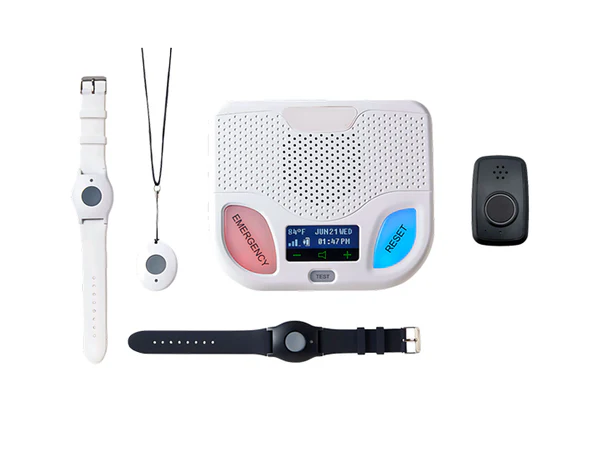
The One Call Alert includes the base unit, a pendant, and a cable. The Classic system offered by One Call Alert is an in-home alert that enables users to communicate with emergency responders via reliable two-way communication.
One Call Alert offers a variety of medical alert devices, including in-home and mobile options. The devices provide two-way voice communication, optional fall detection, light-weight wearable devices, and water-resistant designs. The service also allows nominated contacts to receive alerts for added peace of mind.
One Call Alert Pricing & Plans
One Call Alert systems start at $19.95 per month, based on the device and features. In both instances, activation and shipping are free. No long-term contract obligations are required, and add-ons like automated fall detection are available for an additional monthly charge. One Call Alert offers flexible billing options, including monthly and annual plans with discounted rates for yearly payments.
Pros & Cons
Pros
- Affordable monthly plans
- Water-resistant, wearable devices
- Optional fall detection available
Cons
- Smaller device selection than some competitors
- Fewer advanced features, like GPS tracking on home devices
Who It’s Best For
One Call Alert is perfect for seniors who spend most of their time at home and want an effective and easy-to-use medical alert system. It is also a good pick for families focused on easy monitoring and transparency, without long-term commitments. It is also a convenient system for those who prefer a pendant device, as it is water-resistant for showers and kitchens.
One Call Alert gives a long-range transmission, reliable battery life, and easy setup. The optional fall detection feature instantly notifies the monitoring center when a fall is detected, ensuring help is on the way, especially if the user cannot press the button themselves. The user and their loved ones can have peace of mind that help is available 24/7.
The company is highly rated for its customer service, with a strong reputation regarding the quick responses of its monitoring center. It is also known for its simple user interface, making it a trusted choice for in-home safety.
To learn more, read our full One Call Alert review.
Our Methodology: How We Tested the Medical Alert Systems
Retirement Living tested the top ten medical alert systems. These systems help keep seniors safe and give families peace of mind as their loved ones age at home. As mystery shoppers, we carefully checked each brand and website. We focused on key features like:
- Equipment quality
- Range and connectivity
- Response times
- Fall detection capabilities
- Battery life
- Customer service excellence
To provide the most comprehensive insights, we went beyond research. We bought and set up the devices. Then, we contacted monitoring centers to check response times. Finally, we looked at the overall user experience. We also talked to aging-in-place specialists and accessibility experts. They helped us pinpoint important factors for seniors and their families when selecting a medical alert system.
Compare the Best Medical Alert Systems for Seniors
We compared the best medical alert systems by reviewing their monthly costs, device types, in-home range, battery lifespan, and response time. Check out the table below to see how our top picks stack up.
| Brand | Starting Monthly Cost | Device Type | In-home Range | Battery Life | Response Time |
|---|---|---|---|---|---|
| Medical Guardian | $27.95 | – In-home – Pendant – Bracelet – Smartwatch | Up to 1,400 ft | Up to 5 days | 25 seconds |
| Personal Living Alert | $22.90 | – In-home – Pendant – Bracelet – Smartwatch | Up to 2,000 square ft | Up to 5 days | 18 seconds |
| ADT Medical Alert | $26.99 | – In-home – Pendant – Bracelet | 300 – 600 ft | Up to 40 hours | 15 seconds |
| Lively | $24.99 | – Pendant – Jitterbug flip phone – Jitterbug Smartphone | N/A | Up to 40 hours | 15 – 20 seconds |
| Medical Care Alert | $29.95 | – Base unit – Help button (wrist or necklace) – Wall mount – Lockbox | Up to 1,000 ft | Up to 72 hours | 17 seconds |
| LifeStation | $36.95 | – In-home – Smartwatch – Pendant | Up to 1,400 ft | – 5 days (Mobile) – 32 hours (In-home) | 20 seconds |
| Life Alert | Varies | – In-home – Pendant – Mobile unit | Up to 1,000 | Up to 10 years | 120 seonds |
| LifeFone | $24.95 | – In-home – Pendant – Bracelet – Smartwatch | Up to 1,300 ft | 24 hours – 10 days | 15 seconds |
| GetSafe | $29.95 | – In-home – Pendant (optional) | No specified | Up to 5 years | 25 seconds |
| Bay Alarm Medical | $24.95 | – In-home – Pendant – Smartwatch | Up to 1,000 ft | 2 – 5 years | 10 seconds |
| Lifeline | $27.95 | – In-home – Pendant | Up to 800 ft | Up to 4 days | 30 seconds |
| One Call Alert | $19.95 | – In-home – Pendant – Wrist Button | – Up to 1,400 ft (In-home) – Up to 600 ft (Landline) | – 24 hours (Mobile) – 30 hours (Base Station) – 5 years (Pendant & Wrist Button) | 17 seconds |
Types of Medical Alert Systems
Today’s best medical alert systems don’t just sit on a base station. Many connect to smart speakers, smartphones, and wearables so you and your caregivers can check in, get alerts, and call for help using devices you already use every day. This kind of integration can be especially helpful for tech-comfortable seniors and long-distance caregivers who want more visibility without adding extra steps to their routine.
Medical Alert System Integration with Smart Home and Health Tech
If smart home and health tech are high on your list when comparing the best medical alert systems, start with how you already use technology:
- Alexa or other smart speakers in the home: Look closely at Lively, LifeStation, and Medical Guardian for Alexa-enabled features and caregiver tools.
- Apple Watch or iPhone users: Lively’s app-based access on Apple Watch and iPhone may reduce the need for an extra wearable.
- Voice-first, button-shy users: GetSafe’s voice-activated wall units give you hands-free access to help in bathrooms, bedrooms, and hallways.
Smart home integration doesn’t replace the core safety features of a medical alert system, but it can make it easier for you and your caregivers to use those features every day. Understanding the difference between medical alert systems and Apple Watches or other smart home tools will help you choose which works best for you.
Medical Alert Systems for Specific Health Conditions or Special Groups
Some medical alert systems offer features that support users with unique medical needs. The right device depends on how predictable the condition is, whether the user wears a button consistently, and how much caregiver oversight is needed.
Dementia and Alzheimer’s
For users who wander or may forget to press a button, look for systems with GPS tracking, caregiver apps, and anti-wandering alerts. Personal Living Alert offers an anti-wandering service, and Lively, Medical Guardian, LifeStation, and Bay Alarm Medical all provide real-time location sharing for families.
Parkinson’s Disease
Because tremors, mobility changes, and fall risk are common, systems with high-accuracy fall detection, easy-to-press buttons, and lightweight wearables work best. Medical Guardian, LifeFone, and Bay Alarm Medical offer reliable fall detection and comfortable pendants or bracelets suitable for daily use.
Epilepsy
Medical alert systems help during seizures when the user may not be able to press a button. Choose devices with automatic fall detection, 24/7 monitoring, and GPS for safety outside the home. Lively, Medical Guardian, LifeFone, and Medical Care Alert provide fall detection with fast response times.
Disabilities or Chronic Illnesses
For users with limited hand mobility, fatigue, or chronic conditions like heart disease or diabetes, look for voice-activated options, simple wearable buttons, and caregiver notifications. GetSafe’s in-home voice-activated buttons help those who can’t reliably press a pendant, while Medical Guardian, LifeStation, and Lively offer apps that keep caregivers updated.
Younger Adults With Medical Needs
Medical alert systems aren’t just for seniors. Younger adults living with chronic illness, seizure disorders, or mobility limitations benefit from mobile GPS devices, smartwatch options, and text/email caregiver alerts. Lively, Medical Guardian, and Bay Alarm Medical offer discreet devices that fit into an active lifestyle while still providing reliable monitoring.
Medical Alert Systems for Active Lifestyles and Outdoor Use
For older adults who walk daily, run errands independently, or spend time outdoors, a strong mobile medical alert system matters. The best fit includes GPS tracking, long battery life, and lightweight wearables that won’t get in the way. Brands like Medical Guardian, Lively, Bay Alarm Medical, and LifeFone offer mobile devices designed for movement, with fast response times and accurate location services. These systems support independence while ensuring help is available whether you’re in the neighborhood, on a trail, or traveling.
Medical Alert System Performance in Rural or Low-Connectivity Areas
If you live in a rural community or an area with weak cell coverage, choosing the right medical alert system is essential. Cellular devices work only where the network is strong, so look for companies offering landline-compatible in-home systems, strong backup batteries, and AT&T or Verizon network options. Medical Care Alert, Lifeline, Bay Alarm Medical, and Medical Guardian all provide landline or dual-network solutions that deliver more reliable coverage in remote areas. For the most consistent performance, test the device throughout the home and the surrounding property to confirm signal strength before committing to the long term.
How Medical Alert Systems Work
A medical alert system connects users to emergency help with the press of a button. The button is located on a wearable device, such as a pendant or wristband. When activated, the system quickly reaches a 24/7 monitoring center. There, trained professionals check the situation and send help if necessary.
“The Life Alert dispatcher stayed on the line until the emergency people arrived to take me to the hospital. Excellent service, so worth it,” said one online reviewer of Life Alert in March of 2025.
Here’s how medical alert systems typically work:
Step 1: Press Your Help Button
If the medical alert system user falls or has an emergency, they can press the help button. This button is on their wearable device, mobile device, or base unit. Pressing the button triggers help. Some devices with automatic fall detection can trigger an alert even if the user is unable to press the button.
Step 2: Connect to Response Center
When the help button is pressed, the device connects the user to a trained agent at the monitoring center. This happens through two-way voice communication. The agent will assess the situation, speaking directly with the user to determine the type of assistance needed.
Step 3: Get the Right Help
In an emergency, the monitoring center can send local responders, reach out to family, or do both. The goal is to ensure that the user receives prompt, appropriate help while keeping caregivers informed.

Pros and Cons of Medical Alert Systems for Seniors
Medical alert systems help seniors stay independent and age at home. They are a valuable resource for those who want to live on their own. According to the CDC, falls are the leading cause of injury for adults aged 65 and older. In fact, approximately 14 million older adults, or about 1 in 4, report falling each year. A medical alert system provides a sense of security for seniors and peace of mind for family and friends.
Medical alert systems are great because they offer quick help for seniors. They’re useful when someone falls, can’t move, or faces a medical emergency. They can help seniors remain independent in their own homes for longer periods without sacrificing their safety. With 24/7 monitoring, seniors have access to help around the clock. Medical alert devices are made to be simple to use. They are easy to set up and come with clear instructions.
Medical alert systems have drawbacks. They come with upfront and ongoing costs. This can be a problem for older adults on a fixed or limited income.
From The Expert
“For many older adults, especially those using walkers or facing early signs of cognitive decline, a medical alert system may not be effective without the right support. It’s not just about pushing a button in an emergency—it requires remembering to wear the device, charge it daily, and manage subscription features. Before choosing a system, consider how memory, attention, and physical ability may impact day-to-day use.”

Dawn Heiderscheidt,
OTR/L, ECHM, CAPS
Functional Design Consultant
How Much Does a Medical Alert System Cost?
According to the National Council on Aging (NCOA), in 2025, a monthly subscription for a medical alert system generally costs between $20 and $50. However, many medical alert systems have additional expenses, including fees for equipment that range from $0 to $200, depending on the company, as well as activation, installation, fall detection, and accessory fees. If you opt for an annual subscription, you can sometimes shave a few dollars off your monthly cost. In some cases, medical alert systems may even be free through Medicaid waivers, veterans programs, or nonprofit assistance.
Some medical alert systems could be tax-deductible if they are prescribed by a doctor and certain criteria are met.
| Brand | Monthly Subscription | Fall Detection | Equipment/Activation |
|---|---|---|---|
| Medical Guardian | $27.95 – $42.95 | $10/month | None |
| Personal Living Alert | $22.90 – $55 | Not disclosed | $100 activation fee, first three months of plan, $22 flat rate shipping |
| ADT Medical Alert | $31.99 – $41.99 | $11/month | $99 one-time activation fee |
| Lively | $24.99 – $34.99 | $9.99/month | $79.99 activation fee |
| Medical Care Alert | $19.95 or $45.95 | $10/month | None |
| LifeStation | $19.95 – $36.95 | $8 – $16/month | $99.95 one-time activation fee |
| Life Alert | $49.95 – $109.85 | Not disclosed | $95 – $198 |
| LifeFone | $27.95 – $64.95 | $5/month | None unless getting an extra button |
| GetSafe | $29.95 | $10/month | One-time equipment fee varies |
| Bay Alarm Medical | $24.95 – $39.95 | $10/month | None unless purchasing add-on equipment |
| Lifeline | $27.95 – $44.95 | $99.95 setup fee | $99.95 setup fee |
| One Call Alert | $19.95 – $49.95+ | $10 – $11/month | None |
Medical Guardian
Great variety
Call chain for caregivers
Sleek, stylish wearable devices
ADT Medical Alert
Great plans
Home temperature monitoring
Fixed-rate service
Hidden Costs and Fees: What to Watch Out For
While monthly subscription prices usually fall between $20 and $50, many medical alert companies add fees that aren’t obvious at first glance. Common hidden costs include activation fees, installation charges, shipping, and equipment fees that vary widely — from $0 to over $200, depending on the brand. Fall detection, smartwatch upgrades, and caregiver app access also raise the total monthly cost.
Some brands require multi-month prepayment and charge restocking fees if you return equipment, or increase prices after the first billing cycle, unless you’re on a locked-in rate. If you live in a rural area, keep in mind that certain devices require strong cellular coverage, which may mean paying more for dual-network or landline-compatible systems. These small details can significantly change the long-term cost of ownership, so it’s helpful to review all extra fees before subscribing.
Additional Medical Alert System Fees
Medical alert systems include optional or add-on fees that vary by brand. These add-ons aren’t always necessary, but they improve safety and convenience depending on your needs. Extra costs include shipping, additional pendants or wall buttons, lockboxes, and protection plans that cover lost or damaged equipment. Some companies offer telehealth features, daily check-ins, or caregiver apps for an additional monthly charge.
If you share your home with a spouse or caregiver who also needs monitoring, some brands charge for spouse coverage or extra accessories like Bella Bands and Bella Buttons from Bay Alarm Medical. Reviewing these fees ahead of time helps you choose a system that fits your needs without paying for options you don’t use.
Types of Medical Alert Systems for the Elderly
There are two types of medical alert systems: in-home and on-the-go.
In-home medical alert systems work like a home security system — a base unit connects you to a monitoring center with trained staff. With in-home medical alert systems, you’ll plug the base unit into an outlet and wear the portable help button as a necklace, wristband, or pendant. These systems include a battery backup in case of a power outage, but you’ll need to stay within range of the base system for it to work.
Note that most in-home medical alert necklaces and bracelets don’t have speakers. If you press it during an emergency, you may not be able to hear the call center from where you’re located. However, you can create an emergency response plan that asks the monitoring center to dispatch services even if they can’t speak with you.
On-the-go medical alert systems use a cell phone to connect with the help center. This lets you take the system with you as a necklace or watch. These systems come with rechargeable batteries. Some mobile medical alert systems also have GPS. This lets caretakers and family members check your location when you wear the device.
Key Medical Alert Device Features & Technology
Basic features of medical alert systems include:
- Connection to a 24/7 monitoring center
- Location tracking
- Waterproof devices
You should expect these from all medical alert systems.
When choosing a medical alert system for yourself or a loved one, ask key questions. This helps you find the system that fits your needs best. These include whether it’s monitored, what technology it requires (landline, cellular, or WiFi), and whether it has fall detection.
There are also a few mistakes to avoid, such as locking into a long-term contract. It’s also helpful when buying technology like this to be an informed buyer and understand the basic medical device statistics.
Range and Connection
This is the longest distance an at-home base unit can connect with your help button. In-home medical alert ranges are typically between 300 and 2,000 feet. This includes multi-level homes. While you won’t need to consider range with on-the-go systems, they will only work in areas with an adequate cell signal.
Automatic Fall Detection Technology
Fall detection technology is often part of medical alert systems. We suggest buying this service if your budget allows. Fall prevention stats show that medical alert devices don’t always detect falls accurately. Still, these devices can help protect at-risk seniors.
Medical alert devices with fall detection usually need the user to press a button to reach a call center. This is known as a non-monitored medical alert system. For an additional monthly cost, some medical alert systems offer the option for monitored systems. Call center representatives told us that automatic detection only engages if the system doesn’t detect movement after a fall.
Battery Life
A long battery life is especially important for on-the-go systems. Most mobile system batteries last for several days. Medical Guardian, GetSafe, and Personal Living Alert can last up to five days. Watch batteries should last at least a few days, and necklaces and bracelets typically last one to three years. Overall, battery life also varies depending on the cell signal strength and how much you use the device.
Battery life isn’t as important a consideration for at-home systems since the base station stays plugged in. If there’s a power outage, most base stations include a backup battery.
Response Times
Emergency response time is how long it takes to reach a monitoring center after calling for help or activating a fall detection device. All of the best medical alert systems we evaluated have response times of one minute or less.
Coordinate your emergency response plan when setting up your account. This will let the call center know how you want to communicate during emergencies. You can ask the monitoring center to send emergency services each time, or you can call a family member first.
Additional Features
Not all medical alert systems are identical; they all carry slightly different features that can include, but are not limited to:
- Water resistance
- GPS tracking
- Step tracking
- Medication reminders
- Home temperature monitoring
- Caregiver alerts
- Wall buttons
- Voice activation
- Telehealth
- First-motion-of-the-day monitoring
- Spouse monitoring
- Daily check-ins
- Lockbox
- Free shipping
- Free activation and installation
Great variety
Medical Guardian
- Call chain for caregivers
- Sleek, stylish wearable devices
Medical Alert Systems FAQs
Return and cancellation policies vary widely across medical alert companies, so it helps to understand the differences before you subscribe. Some brands, like Medical Care Alert and Bay Alarm Medical, offer risk-free trial periods that let you test the system at home before committing. Others provide prorated refunds but may charge restocking or shipping fees when equipment is returned.
Month-to-month plans are the most flexible, while companies requiring multi-month prepayment or long-term contracts can make cancellations more complicated and more expensive. Always review the fine print for trial length, refund rules, and any equipment fees that apply when ending service.
Fall detection adds an extra layer of safety, but no system detects every fall with perfect accuracy. Most devices use motion sensors and accelerometers to detect rapid downward movement followed by a period of inactivity. This works well for hard, straight falls but is less reliable for slow slides, falls against furniture, or controlled descents.
False alarms can also occur during vigorous activity. Because fall detection may not engage in every scenario, it’s still important to wear the device consistently and press the help button whenever possible. For high-risk users, combining fall detection with 24/7 monitoring and a strong caregiver plan provides more complete protection.
Setting up a medical alert system is usually simple and takes only a few minutes. For in-home units, plug the base station into a power outlet and, if required, a landline or cellular connection. Then, power on the wearable pendant or bracelet and make a test call using the help button to confirm two-way communication with the monitoring center.
For mobile devices, charge the unit fully, activate service per the company’s instructions, and verify GPS and fall detection features if included. Once the system is active, test it in every major room — and outside areas like the driveway or yard — to confirm reliable coverage throughout your home.
No, Medicare does not typically cover medical alert systems. Some Medicare Advantage plans may cover you for a short time. After that, you’ll face any fees that apply. For details on your options, check our article about insurance coverage for medical alert systems. It explains how insurance may handle medical alert systems.
The three types of connectivity for medical alert systems are landline, Wi-Fi, and cellular network. One of these is required to connect and function properly.
To determine the required range for in-home systems, consider the size of the home, the distance to outdoor areas, and the thickness of walls. Most people do well with 600–1,000 feet, but larger homes or properties may need more. In-home systems connect to a base station and typically cover 300 to 1,500 feet.
Here’s a quick look at the range needs for the home size:
→ Small apartment: 300–600 feet
→ Medium/large home + yard: 800–1,500 feet
→ Thick walls or multiple floors: 1,000+ feet or signal booster
If the user is often away from home, a mobile system with GPS and cellular coverage is a better fit. The range does not come into play with these systems. Instead, consider the cell signal.
Yes, some medical alert systems can be set up to alert family, friends, and your emergency contacts in the event of an emergency.
Medical alert systems have a monthly fee that covers monitoring, and in some cases, the equipment cost is included in the monthly fee. If there’s no monthly fee, you probably won’t get 24/7 monitoring. The system will only reach out to your caregivers if something happens.
Concluding Thoughts on Medical Alert Systems
Medical alert systems help keep people safe. They allow those who live alone or couples in retirement to stay independent. These devices offer fast assistance from emergency responders at any time of day. Automatic fall detection provides an additional layer of security should you become incapacitated. The latest technology turns some medical alert systems into a real-time communication center.
In addition to a medical alert system helping in the case of a fall, you can also work to prevent falls by modifying your home and wearing the right shoes. You can also prevent falls through fitness. Some basic movements at home can help improve balance and strength, reducing the risk of falls.
Our Top Medical Alert System Recommendations
Our top medical alert system recommendations include: Medical Guardian, Personal Living Alert, ADT Medical Alert, Lively, and Medical Care Alert.
Factors for buyers to consider based on our experience testing medical alert devices:
1. Consider services beyond just medical alert and fall detection. Today, systems are more advanced. Many brands now provide useful monitoring and safety services, like medication reminders.
2. The service range shows how far the medical alert system works from your home. It’s a key feature to consider when comparing different systems. Test the service in every room of your home, the garage, driveway, and backyard. A system with a limited service range could leave you or a loved one unable to call for help during an emergency. If you’re in a different part of the home, you might not hear the base system’s response. If there’s no answer, the company will call emergency services.
Many medical alert companies listed here offer return policies. These can help you make sure the system fits your home layout. Many brands ask you to press each button in every room. This helps check if you can hear the response team and if your connection is strong.
“The process of checking the device is straightforward, and it gives us reassurance knowing my mom can easily press a button when needed,” said one online reviewer of Bay Alarm Medical in a June 2025 review.
3. Fall detection is best for detecting fall movement and then no movement shortly after. This is key for anyone looking into fall detection monitoring. The system will only reach out to the response center if it detects no movement after a fall. If you’ve fallen and need help but can still move, you must manually press the button to engage the 24/7 call center.
4. All companies featured on this list have U.S.-based monitoring centers and water-resistant buttons. This is important for fast response times and all-day use.
5. Before reaching out to a brand, research key features. Compare what different companies offer. This helps you make informed decisions. (This guide, and our matching tool, help you do that.) Our research shows that some companies use sales tactics when potential customers compare prices over the phone. Utilize online chat features and study the support and FAQ pages online to get an idea of the services offered so you can make a more informed decision.
Narrow your choices to one of our top picks to ensure you choose one of the best medical alert systems on the market.
Additional Medical Alert Systems We Considered
We looked at many medical alert companies. The ones listed below didn’t make our top picks, but they are still good choices for medical alerts. If none of our options fit your needs, read our reviews about the following medical alert companies.