
Retirement Living takes an unbiased approach to our reviews. We may earn money when you click a partner link. Learn More

LifeStation Review

4.8 Overall Rating
Bottom Line
LifeStation excels at offering affordable, no-contract medical alert systems. Customers should insist on Mobile with GPS to receive the full benefit of available technology.


Updated:
About LifeStation
LifeStation provides affordable medical alert systems supported by reliable 24/7 monitoring and a straightforward, no-strings-attached 30-day money-back guarantee. With products priced at less than $1 per day, LifeStation earns our “Great Value” award for offering quality service at an accessible price. Overall, LifeStation stands out for its affordability, month-to-month service agreements, ease of setup, easy-to-understand product selection, and dedication to maintaining US-based monitoring centers.
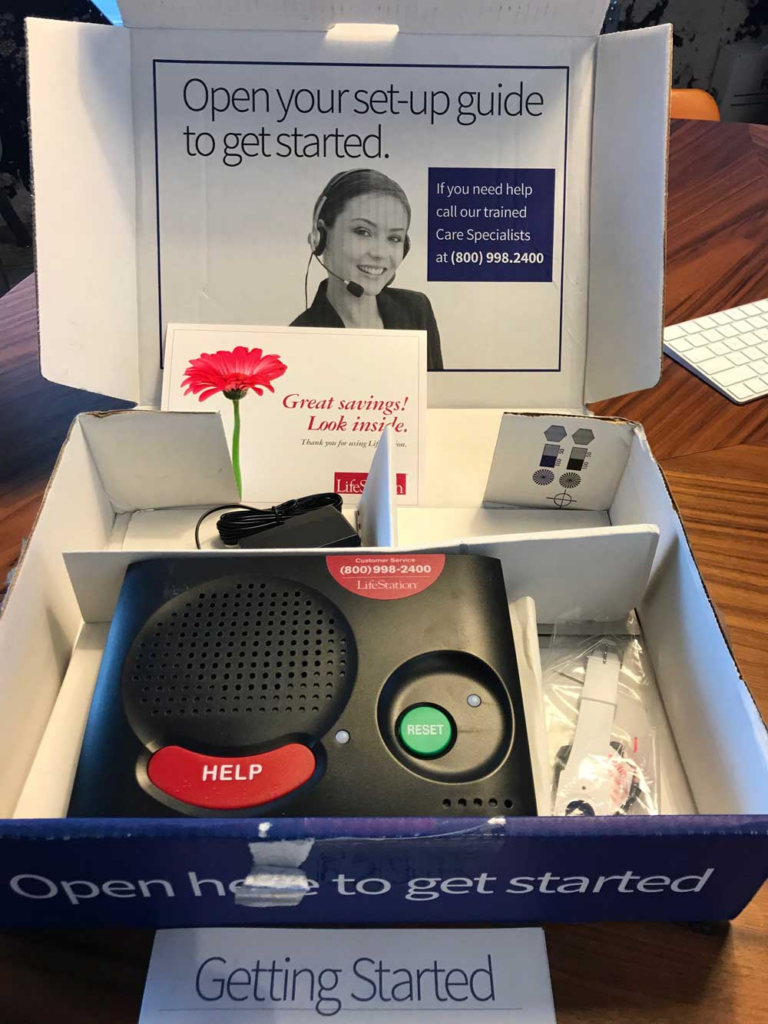
When we received our LifeStation medical alert system in the mail, the first thing we noticed was the clear instructions on the box: “Open here to get started.” Inside the box, we found the In-Home Plus base station, a smartwatch, a power supply, and a detailed setup guide. The setup process was intuitive, and the printed guide included a clear five-item checklist with easy-to-follow directions.
Our device was fully set up in less than five minutes. We plugged in the base station, put on the wristband, and pressed the help button. On the other end, a monitoring center associate answered and assisted us through the activation process.
Pros
- Affordable pricing
- Risk-free trial via 30-day money-back guarantee
- No long-term contract
Cons
- Does not include smoke or carbon monoxide detection
How Does a LifeStation Alert System Work?
Once your LifeStation medical alert system is set up, you can request help by pressing the help button on your wearable wristband or pendant. Some systems, including the one we tested, require a base station and include an additional help button. Pressing the help button connects you directly to the LifeStation monitoring center.
The monitoring center can contact emergency help (911), or notify a designated caregiver if assistance is needed. If you fall while wearing a LifeStation pendant with fall detection, the system automatically alerts the emergency response monitoring center and dispatches help as needed.
LifeStation Plans
LifeStation offers three system options based on connectivity needs: In-Home Traditional, In-Home Plus, and Mobile medical alert with GPS location tracking.
In-Home Traditional, the most affordable option, is designed for customers with landline telephones.
In-Home Plus systems are intended for users without landline phones, with the ability to connect via cellular networks, and some even being able to support WiFi for more reliable in-home communication. The Plus system uses its own cellular connection to contact the monitoring center so you do not need a separate cellular plan.
LifeStation’s Mobile with GPS unit functions similarly but is portable using its own rechargeable battery instead of a wall connection.
We recommend the Mobile with GPS tracking system because it can be used on the go and allows direct communication with the LifeStation monitoring center without a base station, and the opportunity to check on your loved one’s location in real-time.
Picking a LifeStation Device
LifeStation alert systems connect you to a call center, so your choice of system depends on your network connectivity. The Mobile with GPS device is ideal for most users, offering mobility and on-the-go access to monitoring. If you don’t need mobility or want to save money, an In-Home system may be a better choice. Users with landlines in areas with weak cellular reception should choose the In-Home Traditional option.
| In-Home Traditional | In-Home Plus | Mobile with GPS |
|---|---|---|
| $19.95/month* | $32.95/month* | $29.95/month* |
| Landline | Cellular base station | Cellular standalone |
| Range 1000 ft | Range 1000 ft | N/A* |
| Best for rural areas | Best for urban areas | Good for everyone |
* Price with annual prepayment.
** Mobile with GPS is operable within the AT&T cellular network.
Wristband vs. Pendant
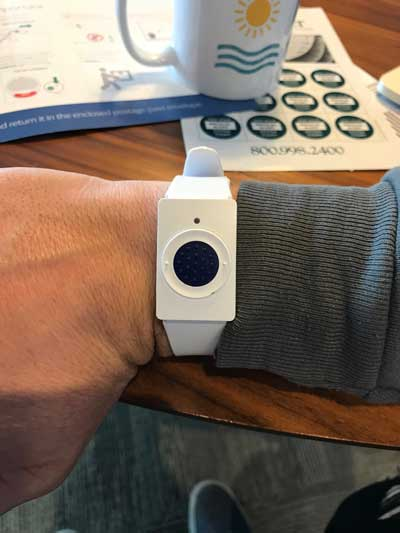
For In-Home systems, you must decide between a wristband or a pendant. Generally, the wristband is a convenient and comfortable option. It can be worn discreetly and remains accessible in case of an emergency.
The optional automatic fall detection feature (+$7/month) requires using a pendant. Both the wristband and pendant are waterproof and offer similar range.
LifeStation Prices
LifeStation’s systems pricing depends on the unit selected. Like many medical alert systems, LifeStation devices are rented rather than purchased outright.
Users pay a monthly fee for monitoring services. Many medical alert companies require lengthy service agreements. However, LifeStation allows month-to-month payments. You are not bound by a long-term contract but must return the equipment when it is no longer needed.
There is no cancellation fee, though 30 days’ notice is required. The price guarantee locks in your monthly fee, ensuring it will not increase. Taxes are included in the monthly fee.
The LifeStation Money-Back Guarantee
A standout benefit of LifeStation is the 30-day money-back guarantee. You can try the system risk-free by requesting it to be shipped to your home. Returns within 30 days are free of charge with no activation fee.
System Testing
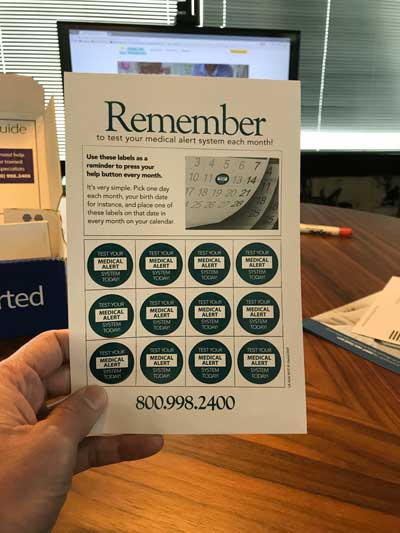
LifeStation demonstrates its commitment to system reliability by performing weekly automated silent tests. LifeStation also encourages users and caregivers to test the system manually using the help button and speaking with a monitoring center or customer service representative.
Call Center
LifeStation operates two UL-listed U.S.-based call centers. UL certification ensures the monitoring centers remain operational during power outages and meet strict safety and maintenance standards.
LifeStation is committed to staffing call centers with trained human operators and providers, not automated systems.
Additional Products
Besides fall detection, LifeStation offers an equipment assurance plan, lockboxes, and additional buttons that can be mounted on walls or worn as pendants or wristbands.
The assurance and protection plan acts like insurance, covering replacement costs if the system is damaged. Lockboxes with keypads allow caregivers or emergency responders to access your home without causing damage. Extra alert buttons can be worn or placed around the home, providing additional access points for emergencies.
These accessories require an additional monthly fee. We recommend selecting as many accessories as possible, as they can improve safety and usability while potentially preventing unexpected costs.
LifeStation Complaints
LifeStation has received overwhelmingly positive online reviews. Customers frequently praise the rapid average response time of emergency services and the system’s ease of use compared to competitors.
LifeStation maintains a 4.4-star rating on ConsumerAffairs and a 4.7 on Trustpilot. Some customers report that the wristband can feel bulky and that battery life may be shorter than expected.
LifeStation is Better Business Bureau (BBB)-Accredited, with an A+ rating and a 100% response rate to customer complaints.
LifeStation FAQs
LifeStation works by connecting users to a 24/7 monitoring center through a help button on a wristband, pendant, or base station. When pressed, the button immediately contacts trained operators who can assess the situation and call emergency services or a designated caregiver if needed. Certain models also feature fall detection, which automatically alerts the monitoring center if a fall is detected, ensuring help arrives even if the user cannot press the button. This system allows seniors to live independently while maintaining quick access to emergency assistance.
If a user cannot speak after pressing the help button, a pre-defined action plan is triggered. Users develop this plan in consultation with LifeStation. Common plans include contacting neighbors or loved ones first. Contacting 911 may be the final step in an action plan, depending on the user’s needs.
LifeStation systems can be upgraded at any time. Upgrading requires returning the old system and activating the new one. There is no upgrade fee, though the monthly cost will reflect the cost of the new system.
LifeStation does not require long-term contracts, giving it an advantage over many competitors. However, a service agreement is required for rented equipment. The service agreement outlines equipment use and confirms that the device remains LifeStation property and must be returned when no longer in use.
LifeStation offers a 30-day money-back guarantee from the date of purchase. Returns within the first 30 days for any reason receive a full refund. No restocking or additional fees apply.
LifeStation does not charge hidden fees. The monthly service fee covers all standard monitoring services, and there are no activation fees or surprise charges. Optional add-ons, such as fall detection or extra help buttons, come with additional monthly costs that are disclosed upfront. Overall, LifeStation’s pricing is transparent, making it easy for users to understand exactly what they will pay each month.
Both the pendant and wristband are fully waterproof. The base unit, however, is not water-resistant.
The Mobile with GPS system provides up to 5 days of battery life between charges. In-Home system batteries are designed to last the life of the device. If a battery is low, LifeStation detects it during weekly silent tests and ships a replacement as needed.
LifeStation systems typically arrive by mail within 2-3 business days.
Conclusion
Considering its ease of setup, affordable pricing, flexible month-to-month agreements, and variety of system options, LifeStation is an excellent choice for a medical alert system.
Its U.S.-based call centers, human-staffed monitoring, and optional fall detection provide additional peace of mind. Optional add-on accessories such as lockboxes, additional buttons, and assurance plans enhance safety and usability, making LifeStation a reliable and adaptable solution for seniors living independently or for caregivers looking to monitor loved ones.
With its 30-day money-back guarantee, users can try the system risk-free, further highlighting the company’s commitment to customer satisfaction.