
Retirement Living takes an unbiased approach to our reviews. We may earn money when you click a partner link. Learn More
Life Alert Alternatives
Alternatives to Life Alert medical alert systems with no long-term contracts, faster response times, and additional features like automatic fall detection include MobileHelp, Lifeline, Medical Guardian, Bay Alarm Medical, Medical Alert, and more.


Updated:
At a glance:
- Life Alert’s monitored systems start at roughly $50/month, whereas the other options on our list start between $20–$35/month. One-time equipment fees are also generally lower for the other brands.
- The alternative medical alert companies on our list don’t require long-term contracts, but Life Alert’s emergency response services are predicated on signing a three-year contract with cancellation fees.
- Life Alert alternatives also generally have faster response times (less than 60 seconds), while Life Alert’s average response time is 68 seconds.
“Help! I’ve fallen, and I can’t get up!” Rings through the ears of countless senior homeowners to this day. However, just because Life Alert had a few memorable commercials in the ’90s doesn’t mean it’s necessarily the best medical alert system for you or your loved ones.
In fact, with countless other brands offering medical alert devices with lower monthly fees, more life-saving add-ons, faster response times, and a variety of wearable devices, it’s often worth considering the competition.
Luckily, our team is here to help you compare Life Alert alternatives that offer both in-home and mobile systems, so you can find a system that gives you, your caregivers, and your family members daily peace of mind without breaking the budget.
Understanding Life Alert’s Devices and Emergency Services
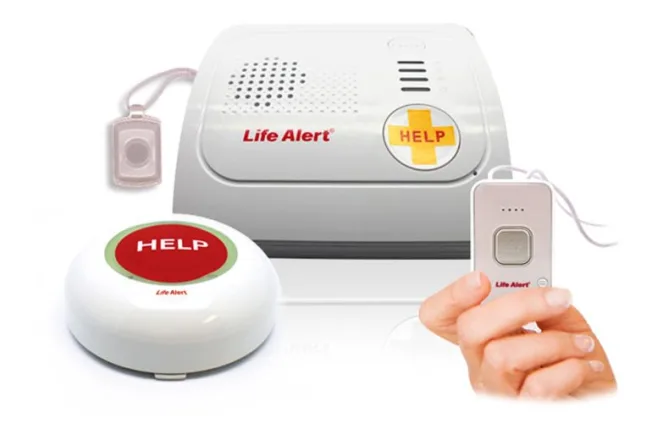
While Life Alert’s in-home systems and mobile help buttons have different price points, they both require you to sign a three-year contract and pay a one-time $197 equipment fee. All systems are fully monitored, giving you 24/7 access to the response center during medical emergencies. Systems that use a cellular network also support GPS location tracking.
Here are the monthly costs and features included with Life Alert’s devices:
| Life Alert system | Monthly starting cost | Device type | Key features |
|---|---|---|---|
| Master Unit | $49.95 | At-home (landline) | Waterproof help button, 72-hour backup battery |
| Master Unit + Help Button | $69.95 | At-home (landline) | Waterproof wearable help button, wall button |
| Mobile + GPS Unit | $69.95 | Mobile and at-home (cellular) | GPS tracking, waterproof help button, 72-hour battery life |
| Help Button (Wall-Mounted) | $69.95 | At-home (landline) | Always-on connection to the monitoring center |
The 10 Best Life Alert Alternatives
Many of the Life Alert alternatives listed below offer lower upfront costs and monthly monitoring fees, while including additional features Life Alert lacks, such as caregiver apps, automatic fall detection, etc. Review each brand to determine the best base station or mobile device for your situation.
MobileHelp Review
Great Technology
|
Pros
- First company to offer mobile system monitoring
- Response team that’s highly trained for emergency calls
- Flexible pricing for add-ons and accessories
Cons
- AT&T network coverage may be limited in some areas
As the first medical alert company to offer mobile systems, MobileHelp has spent decades perfecting its products and services. Older adults will have access to both base units that tap into an existing landline and all-in-one mobile devices that are free from long-term contracts. Plans also start at $24.95/month—just over half that of Life Alert’s starting monthly cost ($49). Equipment fees are also generally less expensive.
When it comes to services, highly-trained emergency response professionals are available 24/7 and respond in an average of 26 seconds, compared to Life Alert’s 68-second average response time.
Many of MobileHelp’s systems also include features that Life Alert either charges extra for or doesn’t offer at all, such as automatic fall detection, caregiver notifications, and free lockboxes. In particular, their mobile wristbands and pendants are lightweight, water-resistant, and designed to be worn comfortably throughout the day, including in the shower.
Below, we’ve listed MobileHelp’s products and their features. You can also read our comprehensive MobileHelp review for even more details.
| MobileHelp system | Monthly starting cost | Device type | Key features |
|---|---|---|---|
| MobileHelp Classic Cellular | $24.95 | At home (cellular) | Fall detection, waterproof help button, lockbox |
| MobileHelp Classic Landline | $24.95 | At home (landline) | Fall detection, waterproof help button, lockbox |
| MobileHelp Micro | $34.95 | Mobile and at-home (cellular) | Fall detection, GPS tracking, water-resistant, lockbox |
| MobileHelp Solo | $34.95 | Mobile and at-home (cellular) | Fall detection, GPS tracking, water-resistant, lockbox |
| MobileHelp Duo | $44.95 | Mobile and at-home (cellular) | Fall detection, GPS tracking, water-resistant, lockbox |
Lifeline Review
Great reputation
|
Pros
- Several in-home, mobile, and smartwatch options
- Reliably reviewed AutoAlert fall detection
- Waterproof help buttons for outdoor and shower use
- 30-hour backup battery on in-home base units
Cons
- Equipment and activation fees may apply
- Limited caregiver app features compared to other options
When you’re having a medical emergency, Lifeline has one of the fastest average response times (12 seconds). That means you can get life-saving assistance nearly six times as fast as you would with Life Alert!
Lifeline offers a wider variety of products, including in-home, mobile, and smartwatch-based systems with no long-term contracts. The basic landline system starts at just $27.95/month, well below Life Alert’s $49.95 entry point. You can also add features Life Alert systems lack, such as one of the best automatic fall detection technologies (AutoAlert) and step tracking on smartwatch devices. Plus, all wearable help buttons are waterproof for use in the shower or outdoors.
Some systems have either a $50 activation fee or an $99.95-$159 equipment fee, both of which are lower than Life Alert’s $197 equipment fee.
Learn about Lifeline systems below, or read our full Lifeline review for more information.
| Lifeline system | Monthly starting cost | Device type | Key features |
|---|---|---|---|
| HomeSafe Standard | $27.95 | At home (landline) | Waterproof help button, wall-mounted help button, 30-hour backup battery |
| HomeSafe Cellular | $34.95 | At home (cellular) | Waterproof help button, wall-mounted help button, 30-hour backup battery |
| HomeSafe with AutoAlert | $42.95 | At home (landline or cellular) | Fall detection, waterproof help button, wall-mounted button, 30-hour backup battery |
| On the Go | $39.95 | Mobile and at-home (cellular) | Fall detection, GPS location tracking, waterproof help button |
| On the Go Mini | $44.95 | Mobile and at-home (cellular) | Fall detection, GPS location tracking, waterproof help button |
| On the Go Smartwatch | $34.95 | Mobile (cellular) | Fall detection, GPS tracking, step tracking, waterproof |
Medical Guardian Review
Great variety
|
Pros
- One-month free trial period plus free equipment, activation, and shipping
- Lightweight and water-resistant devices you can wear in the shower
- MyGuardian online portal for easy location tracking and check-ins with caregivers
Cons
- Medicare does not cover the service cost
Medical Guardian is the best Life Alert alternative for seniors who need fast emergency response times, as its monitoring center has the fastest response time on our list (just 8 seconds). This makes it the ideal choice for seniors with severe disabilities or regular medical emergencies.
Further, unlike Life Alert’s three-year contracts and upfront equipment fees, you’ll enjoy no equipment, activation, or shipping fees and a one-month free trial. Monthly fees are also generally lower than Life Alert’s, starting at just $27.95/month for an in-home, landline-based system.
Many Medical Guardian systems also feature automatic fall detection, GPS location tracking, long battery life, and water resistance, giving users added peace of mind whether they’re at home or on the go.
And, for tech-savvy seniors, all of these features tie together on the MyGuardian online portal, which allows caregivers and family members to track locations, receive alerts, and check in remotely.
Check out our product chart below for more details, or visit our Medical Guardian review for an even deeper dive into the company.
| Medical Guardian system | Monthly starting cost | Device type | Key features |
|---|---|---|---|
| MGHome Landline | $27.95 | At home (landline) | Waterproof help button, app compatibility |
| MGHome Cellular | $34.95 | At home (cellular) | Fall detection, waterproof help button, app compatibility |
| MGMini | $39.95 | Mobile and at-home (cellular) | Fall detection, GPS tracking, app compatibility, five-day battery life |
| MGMini Lite | $42.95 | Mobile and at-home (cellular) | Fall detection, GPS tracking, app compatibility, five-day battery life |
| MGMove | $38.95 | Mobile and at-home (cellular) | Fall detection, GPS tracking, app compatibility, three-day battery life, messaging features |
Bay Alarm Medical Review
Great customer service
|
Pros
- Free monitoring for emergency contacts (spouses and other loved ones)
- Device supports 170 languages
- Coverage in all 50 states
Cons
- Automatic fall detection may not register every fall
Bay Alarm Medical prioritizes devices built for accessibility, providing fast average response times (16 seconds), nationwide coverage, multilingual support, and simple pricing. For example, their cellular network is reliable in all 50 states, and emergency monitoring supports 170 languages. This makes them ideal for seniors who travel regularly or live in multilingual households.
Compared to Life Alert’s high monthly fees and long-term contracts, Bay Alarm Medical offers lower starting costs, no long-term commitments, and a wide range of in-home and mobile medical alert systems. Mobile options like the SOS Micro have a $149 fee, while the SOS Smartwatch costs $199. Automatic fall detection is available as an optional add-on for $10/month, and GPS and Wi-Fi location tracking are included with all mobile systems.
Bay Alarm Medical also stands out for its free monitoring for spouses and emergency contacts, which lets loved ones stay informed and protected under a single account at no extra cost.
Learn more about available devices below, or read our in-depth Bay Alarm Medical review.
| Bay Alarm system | Monthly starting cost | Device type | Key features |
|---|---|---|---|
| SOS Home | $27.95 | At home (landline) | Fall detection, 24/7 US-based monitoring |
| SOS Home | $34.95 | At home (cellular) | Fall detection, 24/7 US-based monitoring |
| SOS All-In-One 2 | $34.95 | Mobile and at-home (cellular) | Fall detection, GPS & WiPS tracking, waterproof help button |
| SOS Micro | $34.95 | Mobile (cellular) | Fall detection, GPS tracking |
| SOS Smartwatch | $39.95 | Mobile and at-home (cellular) | Fall detection, GPS tracking, water-resistant |
| SOS Mobile (exclusively sold on Amazon) | $74.95 | Mobile (GPS help button) | Fall detection, GPS & Wi-Fi location tracking, up to 6-day battery life, water resistance, 24/7 US-based monitoring |
Medical Alert Review
U.S.-based monitoring with multilingual support
|
Pros
- Simple setup with easy-to-use devices
- Multilingual, 24/7 UL-certified monitoring
- Compatibility with the Medical Alert Connect app
Cons
- Limited information about device battery life
For seniors who want an easy-to-use Life Alert alternative, Medical Alert is a great option. The company’s wide selection of in-home, mobile, and smartwatch systems comes with no long-term contracts and is easy to set up. At-home systems provide an impressive 800-foot range, making them well-suited for larger homes, while mobile devices include GPS location tracking, two-way communication, and optional fall detection.
While response times aren’t as fast as some of the other options on our list, averaging at 28 seconds, you can still expect to connect to the UL-certified monitoring center nearly twice as quickly as you would with a Life Alert device. Every monitoring center is fully staffed with trained operators who can quickly dispatch emergency services, caregivers, or family members when needed. In fact, connecting to loved ones is made easy with multilingual support and the Medical Alert Connect app.
We examine Medical Alert’s product lineup below, but you can also read our comprehensive Medical Alert review.
| Medical Alert system | Monthly starting cost | Device type | Key features |
|---|---|---|---|
| Home System (landline) | $27.95 | At home (landline) | Waterproof help button, two-way speaker, 800-ft range within the home, base unit with backup battery |
| Home System (cellular) | $37.95 | At home (cellular) | Waterproof help button, two-way speaker, 800-ft range, 30-hour backup battery |
| Mobile System (standard) | $42.95 | Mobile (cellular) | Fall detection, waterproof help button, GPS location tracking, two-way communication |
| Mobile System (mini) | $47.95 | Mobile (cellular) | Fall detection, waterproof help button, GPS tracking, two-way communication |
| Smartwatch | $39.95 | Mobile (cellular) | Fall detection, waterproof, GPS location tracking, two-way communication |
Personal Living Alert Review
Great in-home range
|
Pros
- Transparent pricing with no equipment fees on some devices
- 24/7 monitoring in 50 languages
- Anti-wandering service optional
Cons
- Protection plan costs extra
For seniors who want backup battery capabilities similar to Life Alert’s 72-hour lifespan, Personal Living Alert gets close with a 60-hour lifespan. You’ll also have access to more transparent pricing and 50-language multilingual monitoring, among other features Life Alert lacks.
For example, Personal Living Alert offers more flexible upfront costs, with equipment fees that typically range from $0 to $250 and activation fees between $50 and $100, depending on the device. This tiered pricing structure makes it easier for seniors to choose a system that aligns with their budget, especially when monthly monitoring costs start at just under $30.
The company’s mobile systems include GPS tracking, optional anti-wandering services, and water-resistant resistance that make traveling a breeze. Learn more about available devices below or visit our Personal Living Alert review page for more information.
| Personal Living Alert system | Monthly starting cost | Device type | Key features |
|---|---|---|---|
| PLA In-Home System | $29.99 | At-home (cellular) | Fall detection, Cellular monitoring, 24/7 response, water-resistant |
| Champion Smartwatch | $49.99 | Mobile (cellular) | Fall detection, GPS location tracking, 24/7 response, health tracking, water-resistant |
| Belle + LTE | $44.99 | Mobile (cellular) | Fall detection, GPS & LTE location tracking, 24/7 response, water-resistant |
| PLA On-The-Go | $39.99 | Mobile (cellular) | Fall detection, GPS tracking, 24/7 response, water-resistant |
| Independence Smartwatch | $55.00 | Mobile (cellular) | Fall detection, GPS tracking, water-resistant, 24/7 monitoring (2-year contract) |
ADT Medical Alert Review
Great plans
|
Pros
- Top-ranked security and medical alert services
- US-based call centers for a variety of emergencies
- Temperature monitoring available on some systems
Cons
- Only one cellular carrier network available for mobile systems
While ADT is primarily known as a security company, it offers medical alert devices backed by its strong brand reputation. Their US-based monitoring centers are known for fast emergency response times (15 seconds on average), helping ensure rapid assistance during medical emergencies, falls, environmental concerns, or even break-ins.
While there is a one-time activation fee of around $99, it’s about half of Life Alert’s upfront equipment fee. Monthly costs are also lower, starting at just $29.99 for a basic system. Features of ADT systems include two-way communication, optional fall detection, GPS location tracking, and home temperature monitoring, depending on the system.
Below, we dive deeper into each system, but you can also read our ADT Medical Alert review for more insights.
| ADT Medical Alert system | Monthly starting cost | Device type | Key features |
|---|---|---|---|
| Medical Alert Basic | $29.99 | At-home (landline) | 24/7 monitoring, waterproof, two-way talk, temperature monitoring, 300-ft range |
| Medical Alert Plus | $34.99 | At-home (cellular) | Fall detection, 24/7 monitoring, 600-ft range, waterproof button, home temperature monitoring |
| On-The-Go Medical Alert | $39.99 | Mobile (cellular) | Fall detection, 24/7 monitoring, GPS location tracking, waterproof button |
Lively Review
Great for senior-specific plans
|
Pros
- Compatible with your cell phone, Apple Watch, or Amazon Alexa
- Connects to 24/7 assistance, caregivers, and emergency responders
- Water-resistant for everyday wear and activities
- Lively devices use a reliable Verizon cellular network at no additional charge
Cons
- Lack of speaker quality in noisy settings
- Lively Mobile Plus requires a nightly charge
Lively is a great Life Alert alternative for seniors who want to use their own phones or Apple Watches to monitor their well-being. The company offers all-in-one mobile devices and Jitterbug phones, but these come with one-time equipment fees that vary by device. You can also expect to pay an activation fee of $35 for most systems. No long-term contracts are required.
Lively’s monitoring center has much faster response times than Life Alert’s, averaging at just 12 seconds. Connection reliability is high, with all devices running on the Verizon nationwide cellular network at no extra cost.
Combined with caregiver alerts, optional fall detection, and access to nurses or care advocates on higher-tier plans, Lively is one of the best options for seniors who want a familiar, easy-to-use system. Specific devices and services are outlined below, but you can also learn more by reading our in-depth Lively review.
| Lively system/service | Monthly starting cost | Device type | Key features |
|---|---|---|---|
| Lively Mobile2 All-in-One | $24.99 | Mobile (cellular) | Fall detection, 24/7 urgent response, GPS location, caregiver alerts, app support |
| Lively Mobile2 Premium Plan | $34.99 | Mobile (cellular) | Fall detection, 24/7 urgent response, nurse on-call, care advocate, GPS location, caregiver alerts, app support |
| Jitterbug Flip2 | $14.99 | Mobile (cellular) | Urgent response button, 300 mins/texts, Ask Lively; Preferred and Premium plans include more features, but cost more |
| Jitterbug Smart4 | $19.99 | Mobile (cellular) | Urgent response, Ask Lively, 1GB data; Preferred and Premium plans include more features, but cost more |
| Lively on Apple Watch | $24.99 | Mobile via Apple Watch | Urgent response monitoring using your Apple Watch |
| Lively on Amazon Alexa Devices | $24.99 | Voice-activated smart device | Voice command access to 24/7 urgent response |
LifeStation Review
Great Value
|
Pros
- Waterproof help buttons
- Risk-free trial period with a 30-day money-back guarantee
- No long-term contracts
Cons
- Does not include smoke or carbon monoxide detection
LifeStation offers a variety of in-home cellular systems, GPS-enabled mobile devices, and smartwatch-style wearables. These systems require no long-term contracts or cancellation fees, instead having clear month-to-month payments. Some mobile devices have a one-time equipment fee of $99.95. LifeStation is an excellent alternative for seniors who have never tried a medical alert device, as it offers a 30-day money-back guarantee.
The company also has solid average response times of around 20 seconds, meaning you can get help more than twice as quickly as with Life Alert. Depending on the device, you’ll also have access to two-way communication, waterproof designs, and optional fall detection.
Review their list of available products below, or read our full LifeStation review for more detailed information.
| LifeStation system | Monthly starting cost | Device type | Key features |
|---|---|---|---|
| Sidekick Home | $36.95 | At-home (cellular) | Fall detection, two-way communication, waterproof help button, 24/7 US monitoring |
| Sidekick | $40.95 | Mobile (cellular) | Fall detection, GPS location tracking, waterproof, two-way communication, mobile help button |
| Sidekick Smart | $48.95 | Mobile (cellular) | Fall detection, smartwatch emergency alerts, waterproof, GPS location tracking, two-way communication |
| Pearl | $50.90 | Mobile (cellular) | Fall detection, GPS tracking, waterproof, two-way communication |
Medical Care Alert Review
Great fast response
|
Pros
- Bilingual, US-based EMT/EMD-certified operators
- Variety of devices, including a smartwatch
- Price-locked monthly subscription plans
- Optional fall detection available with all packages
Cons
- Text notifications to caregivers are only available in some plans
- No wellness check service
Last on our list, Medical Care Alert is an affordable Life Alert alternative with faster response times (17 seconds) and flexible device options. Users can quickly connect to US-based, EMT/EMD-certified operators, fostering a safer environment for seniors in need.
Pricing is also clearer and budget-friendly, with monthly plans that lock in prices with no long-term commitments. Most systems come with no equipment fees, making it easier to get started. The only exception is the Smartwatch with GPS, which requires a one-time device fee of $149.95, but functions as both a wearable alert device and a mobile emergency solution.
As for features, all plans support optional fall detection, and many include extras such as lockboxes, waterproof help buttons, and GPS or Wi-Fi location tracking. Take a look at our chart below for detailed information on each product, or read our Medical Care Alert review to learn more about the company.
| Medical Care Alert system | Monthly starting cost | Device type | Key features |
|---|---|---|---|
| HOME Medical Alert System | $29.95 | In-home (landline) | 24/7 monitoring, wearable help button, lockbox |
| HOME & YARD System | $34.95 | In-home (landline) | 24/7 monitoring, wearable help button, lockbox, portable wearable with 600 ft. range |
| HOME-3G | $34.95 | In-home (cellular) | Fall detection, 24/7 monitoring, wearable help button, lockbox |
| HOME & AWAY ULTRA GPS | $39.95 | Mobile (cellular) | Fall detection, waterproof, 3-day battery life, GPS & Wi-Fi triangulation |
| HOME & AWAY DUO | $39.95 | Combined (cellular) | Fall detection, 24/7 monitoring, in-home help button, mobile GPS device, lockbox |
| Smartwatch with GPS | $39.95 | Mobile (cellular) | Fall detection, 24/7 US monitoring, GPS location tracking, two-way communication |
How To Choose the Best Life Alert Alternative For Your Situation
With so many options available, it can be hard to pick the best Life Alert alternative for your situation. However, there are a few reliable ways to narrow down your search for the best company, system, and services:
1. Assess Your Medical Needs
If you have a pervasive disability or consistent medical needs, always choose a medical alert company that offers 24/7 monitoring at a US-based response center. You should also consider devices with features like fall detection or GPS tracking.
2. Consider Your Lifestyle
Are you homebound or do you travel regularly for leisure, errands, or appointments? Landline-based in-home systems are extremely reliable for seniors who spend most of their time at home. Mobile devices like pendants, wristbands, and smartwatches are ideal for on-the-go seniors, especially if you’re often alone.
3. Understand Features and Add-ons
Look for extras like GPS tracking, waterproof devices, caregiver alerts, step tracking, lockboxes, and emergency apps that suit your personal needs. These features may add to the overall cost, but are often worth it.
4. Stick To Your Budget
Knowing how much you can realistically spend upfront and each month is key to choosing the best company. Compare monthly monitoring costs, activation fees, and one-time equipment fees to find a plan that maximizes safety without overspending.
5. Check Availability For Your Location
Most medical alert companies operate nationwide, but may also work better in certain areas. Before you make a purchase, ensure the system works locally and in the specific spaces you frequent, such as your yard or certain travel destinations.
6. Review Coverage Options
Whether you have Medicare, Medicare Advantage, Medicaid, or private insurance, choosing a company/device that’s covered by your insurance is a great way to save money while getting the help you need. Luckily, most of the devices on our list are easily covered with a doctor’s letter of medical necessity (LMN).
7. Read Customer Reviews
You can get surprising insight from customer reviews, so be sure to read some for each company to determine whether the product or service is reliable.
Frequently Asked Questions About Life Alert Alternatives
Life Alert offers monitored medical alert systems that connect you to a 24/7 response center, as do alternatives such as MobileHelp, Lifeline, Medical Guardian, and Bay Alarm. When you fall or experience a medical emergency, devices offered by these medical alert companies (in-home and mobile systems) connect to the company’s monitoring center for a quick, emergency response.
Most landline-based and cellular medical alert systems work by connecting to a dedicated monitoring center. Mobile devices often include GPS tracking, while in-home units communicate with a base station.
No, none of the Life Alert alternatives on our list require the three-year contract that Life Alert does, or cancellation fees. Most only have less expensive equipment or activation fees, followed by month-to-month payment plans you can cancel at any time, free of charge.
Yes, while Life Alert doesn’t have automatic fall detection, all the other companies on our list include it as an optional add-on. Lifeline, in particular, has one of the most reliable fall detection systems.
Life Alert medical alert systems cost between roughly $50–$70/month, while most of the alternatives on our list are less than $50/month. Some even start as low as $25/month for basic in-home systems.
Life Alert does not have a dedicated app for caregiver monitoring, but most of the companies on our list have caregiver apps, alerts, or online portals that your loved ones can use to stay informed about your safety.
Yes, most Life Alert alternatives can respond in half the amount of time or less (8–20 seconds).
Help us improve our medical alert system data! If you’ve recently purchased or received a quote for a medical alert system, email us at [email protected]. Your personal details will remain completely confidential.